 Maxima Plugins
Description
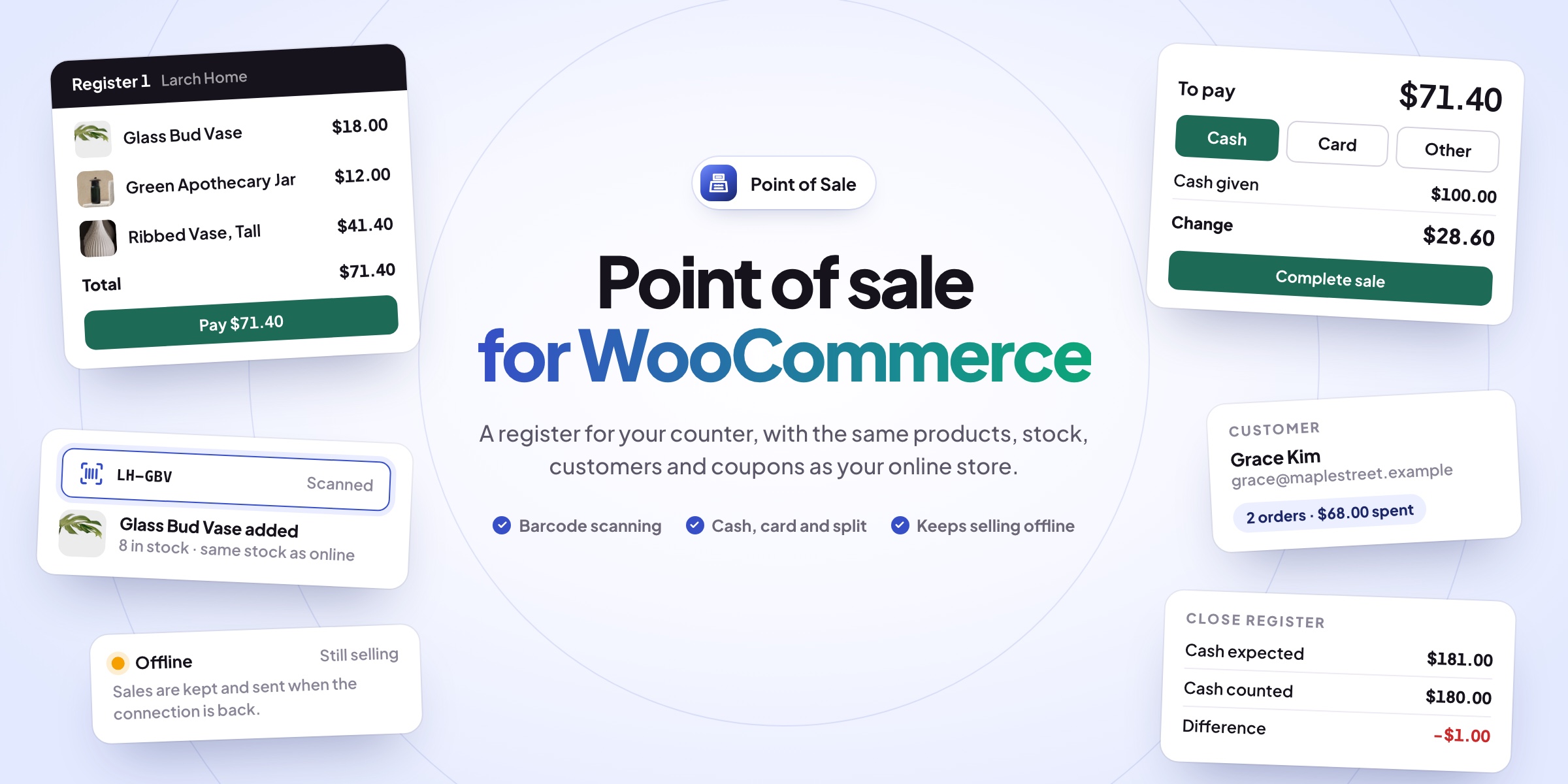
Point of Sale lets you sell in person from the same products, stock, customers and orders as your WooCommerce store. Open the register in a browser on a laptop, tablet or touch screen, scan or tap products, take the payment and print a receipt.
🔍 Scan, tap or search for products, with pictures, stock and a category bar.
🏷️ Discounts at the till: per line, on the whole sale or with WooCommerce coupons.
💵 Cash, card or both, with change worked out and split payments.
👤 Customers found or added by name, email or phone, or a guest sale.
🧮 A cash drawer opened with a float and closed with a count.
📦 One stock: every sale is a WooCommerce order, shared with the online store.
📶 Keeps selling offline and sends the sales when the internet is back.
🧾 Receipts on any printer: 80 mm, 58 mm or A4, gift receipts and emailed receipts.
The register
Scan, tap or search for products
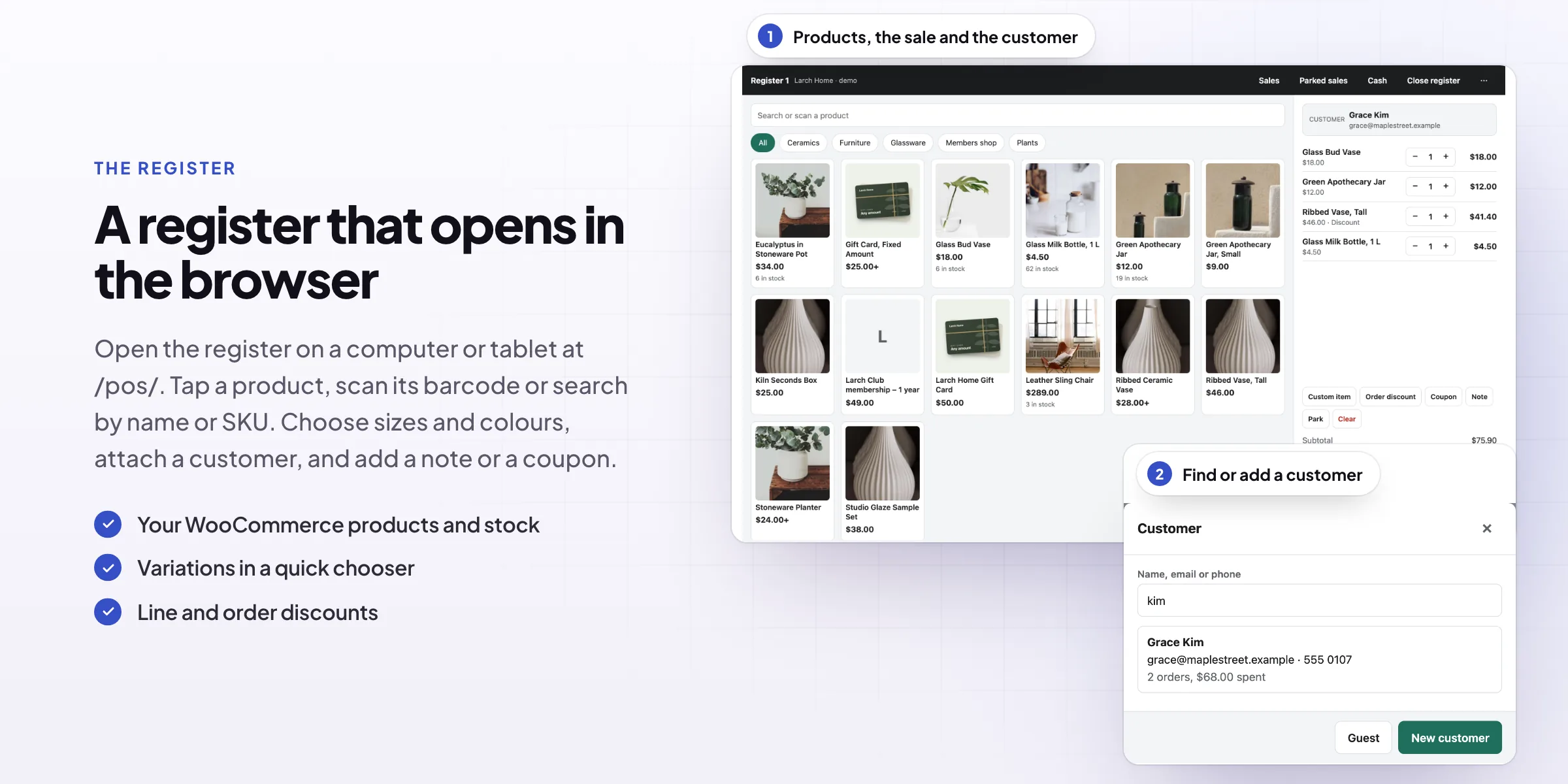
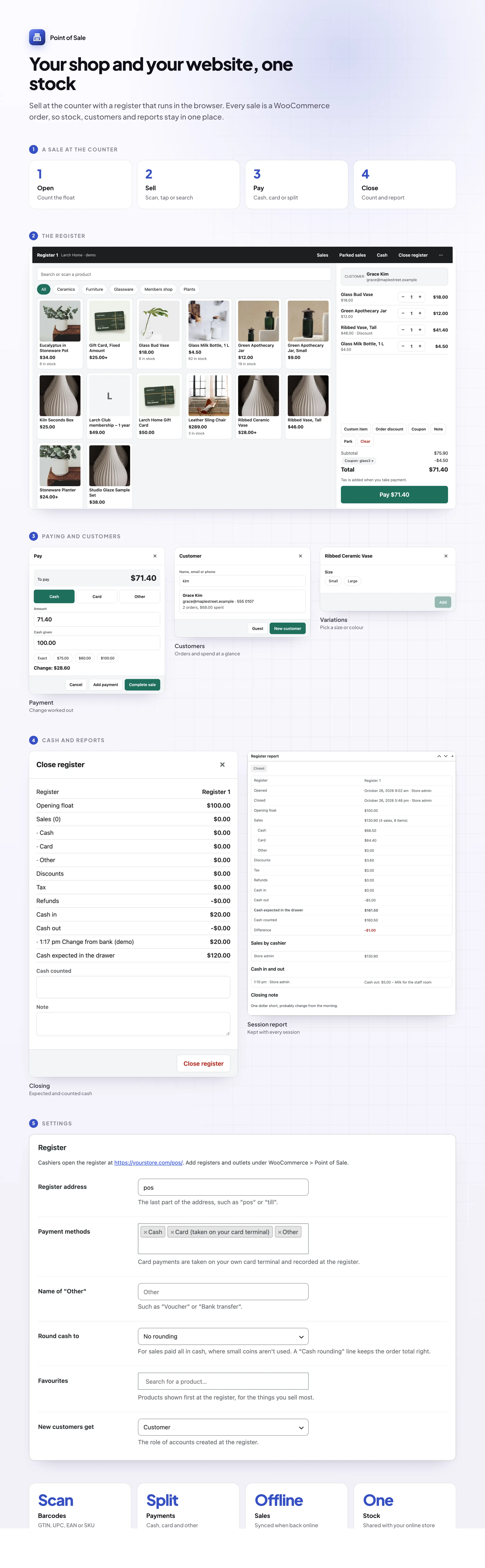
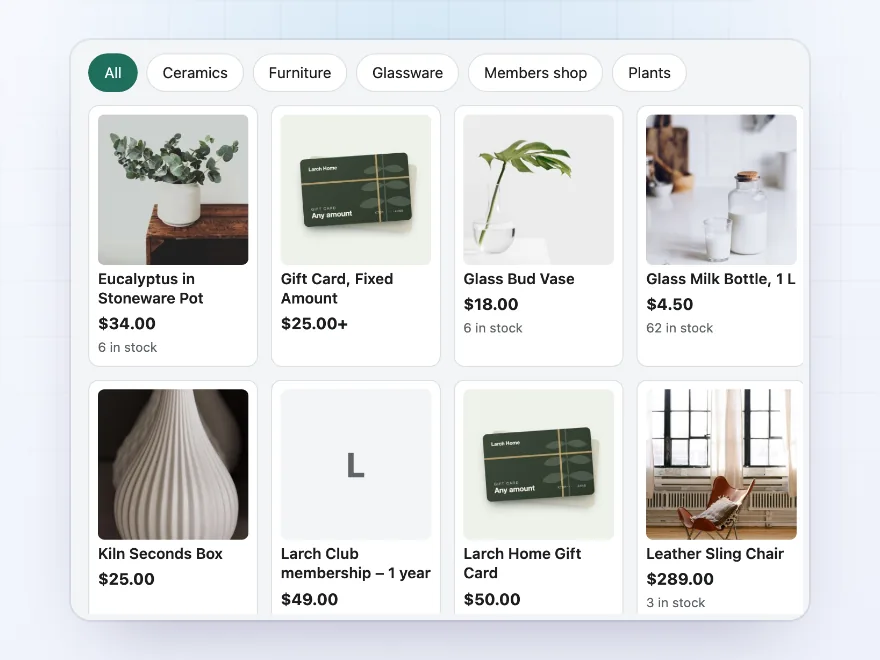
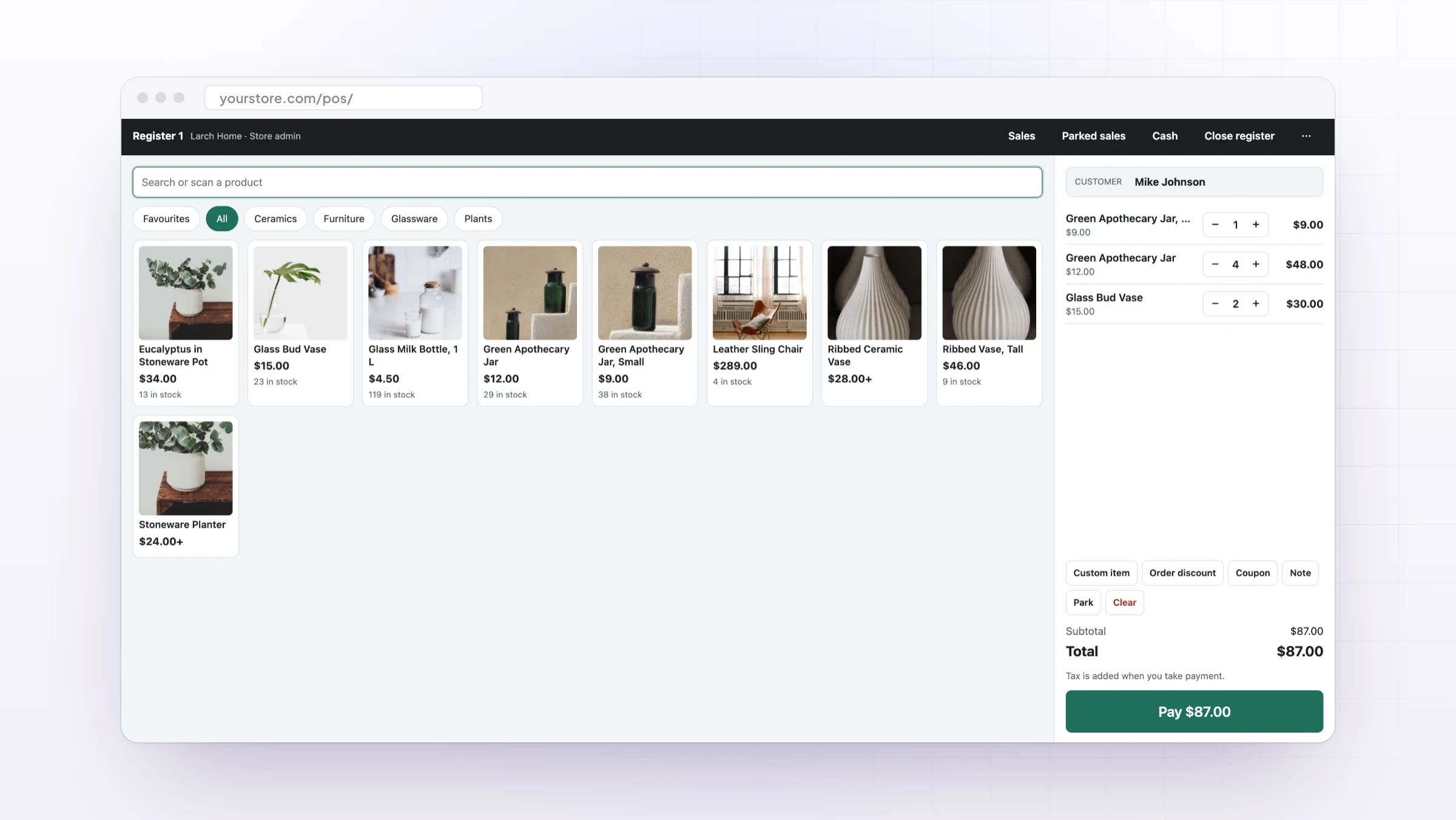
The register opens full screen at yourstore.com/pos/, outside your theme, with large buttons for touch screens. Products show with their pictures and stock, a category bar and favourites for what you sell most. Search by name or SKU, or scan barcodes with a USB or Bluetooth scanner.
- Pictures, stock and a category bar
- Barcode scanners that type like a keyboard
- Options chosen for variable products
Discounts
Line discounts, sale discounts and coupons
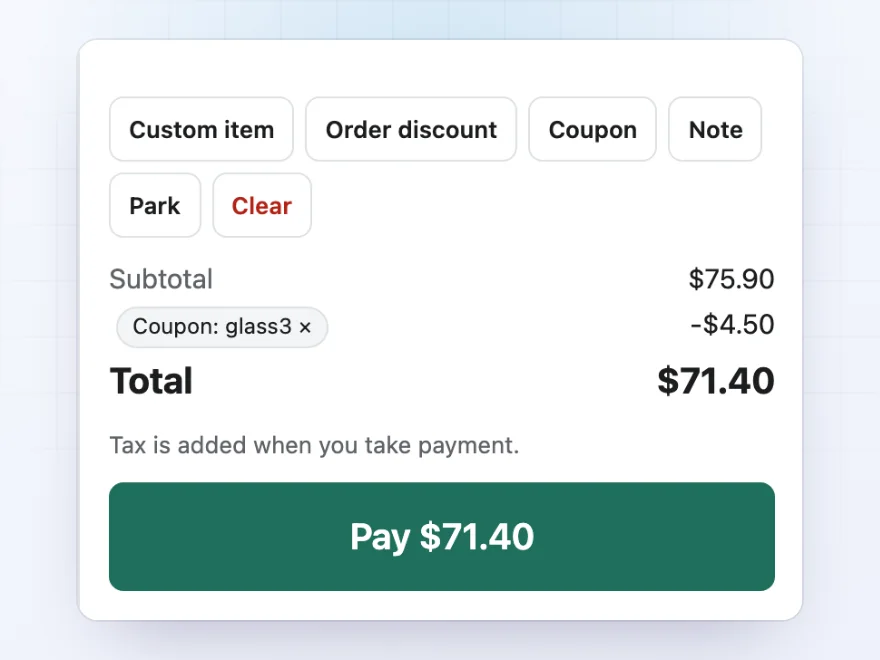
Give a line a percentage or amount off or a new price, add a discount on the whole sale, apply WooCommerce coupons and add a note. Sell something that isn’t in the catalog as a custom item, and park a sale to pick it up later. Tax is worked out at the outlet’s address.
- Discounts per line or on the whole sale
- WooCommerce coupons at the till
- Custom items, notes and parked sales
Payments
Cash with change, card or both
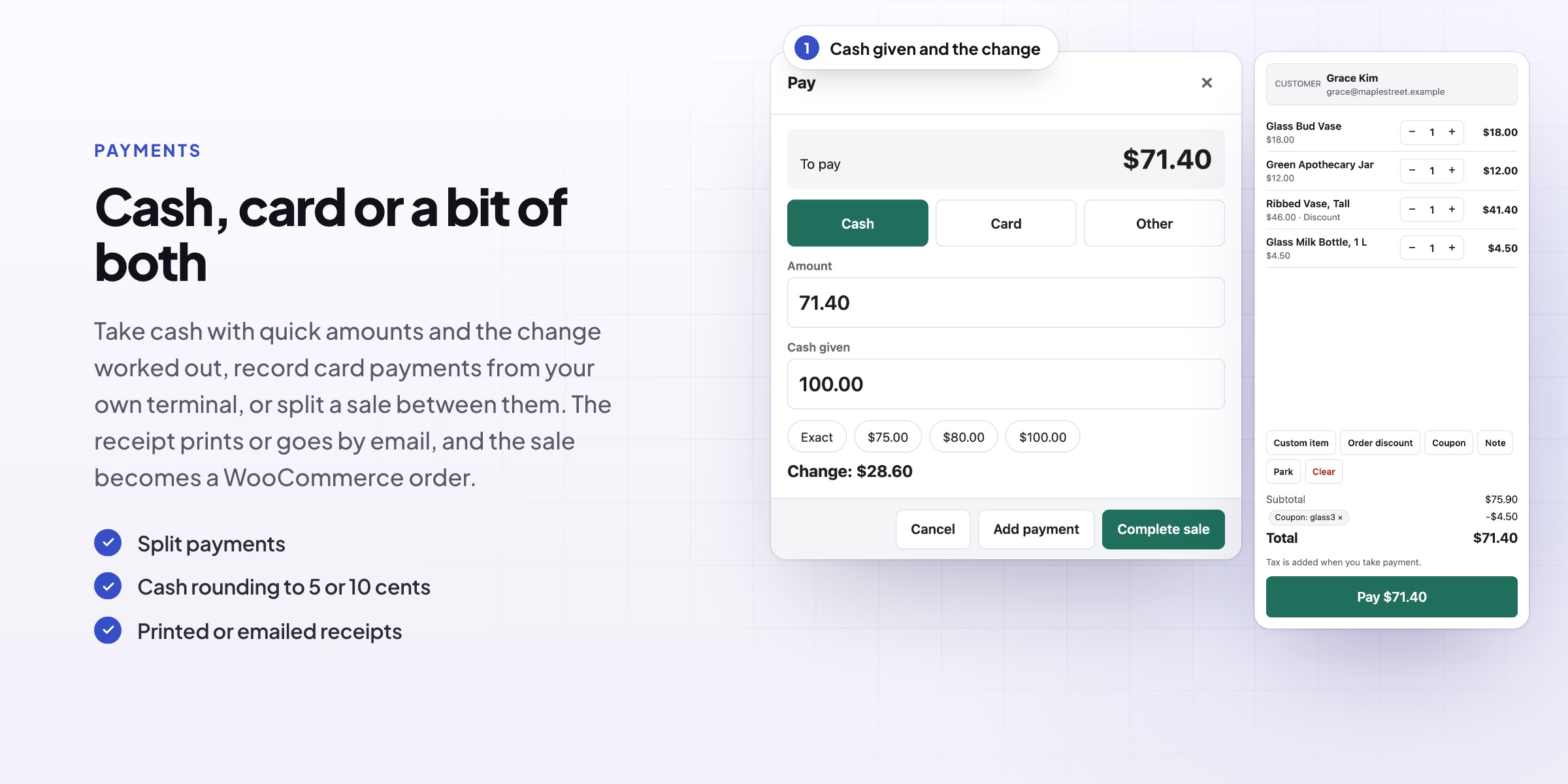
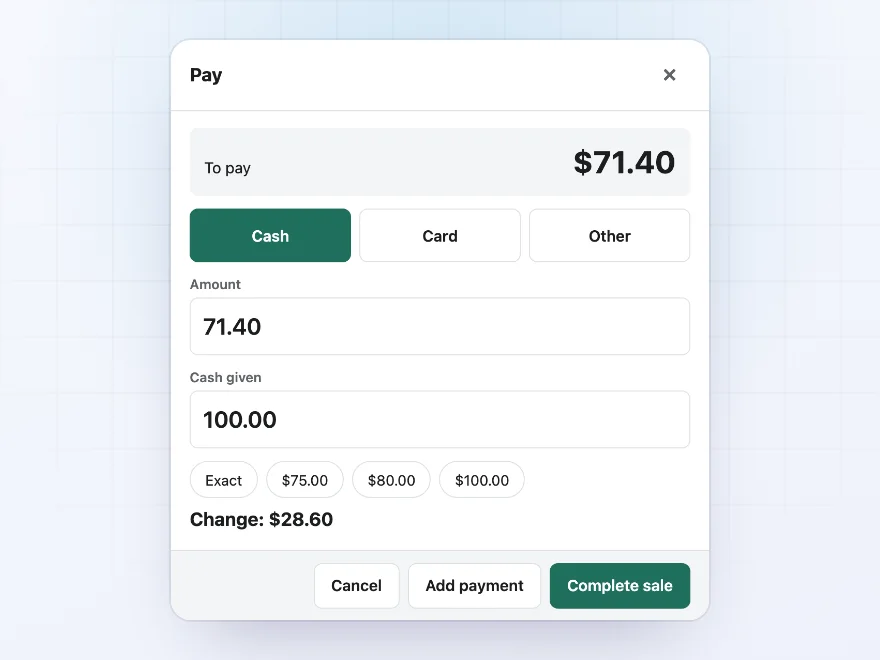
Take cash and see the change, with quick buttons for common notes, record card payments taken on your own card terminal, or use a third method you name, such as Voucher. Split a sale across methods, and round cash sales to your smallest coin with a rounding line that keeps the order right.
- Change worked out for cash
- Card on your own terminal
- Split payments and cash rounding
Customers
Find the customer or add one at the till
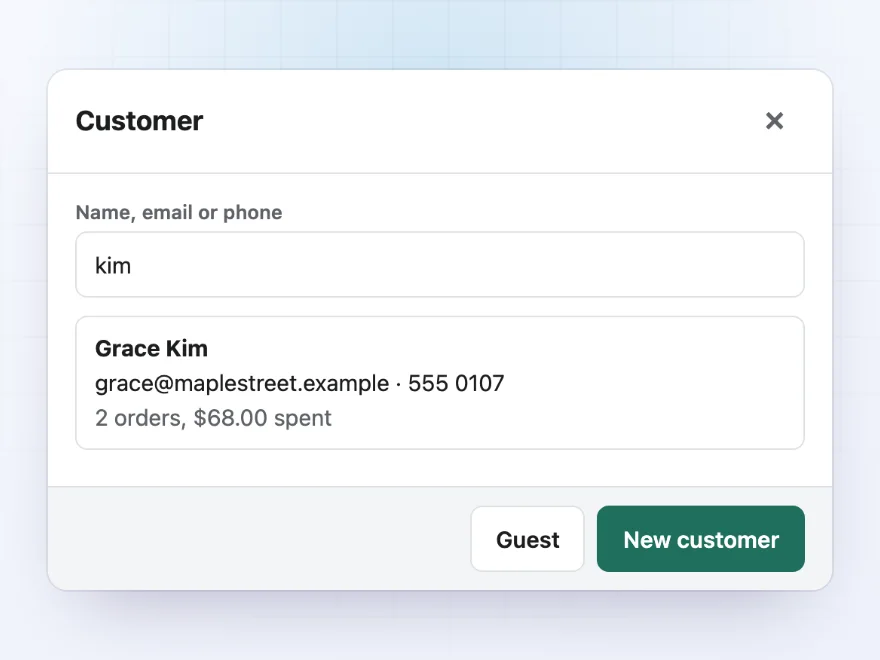
Search customers by name, email or phone and see their orders and what they’ve spent. Add a new customer with their name and email in a few seconds, or sell as a guest. The sale goes on the customer’s account, so it shows in My Account like an online order.
- Search by name, email or phone
- Orders and spending at a glance
- New customers or guest sales
Cash drawer
Open with a float, close with a count
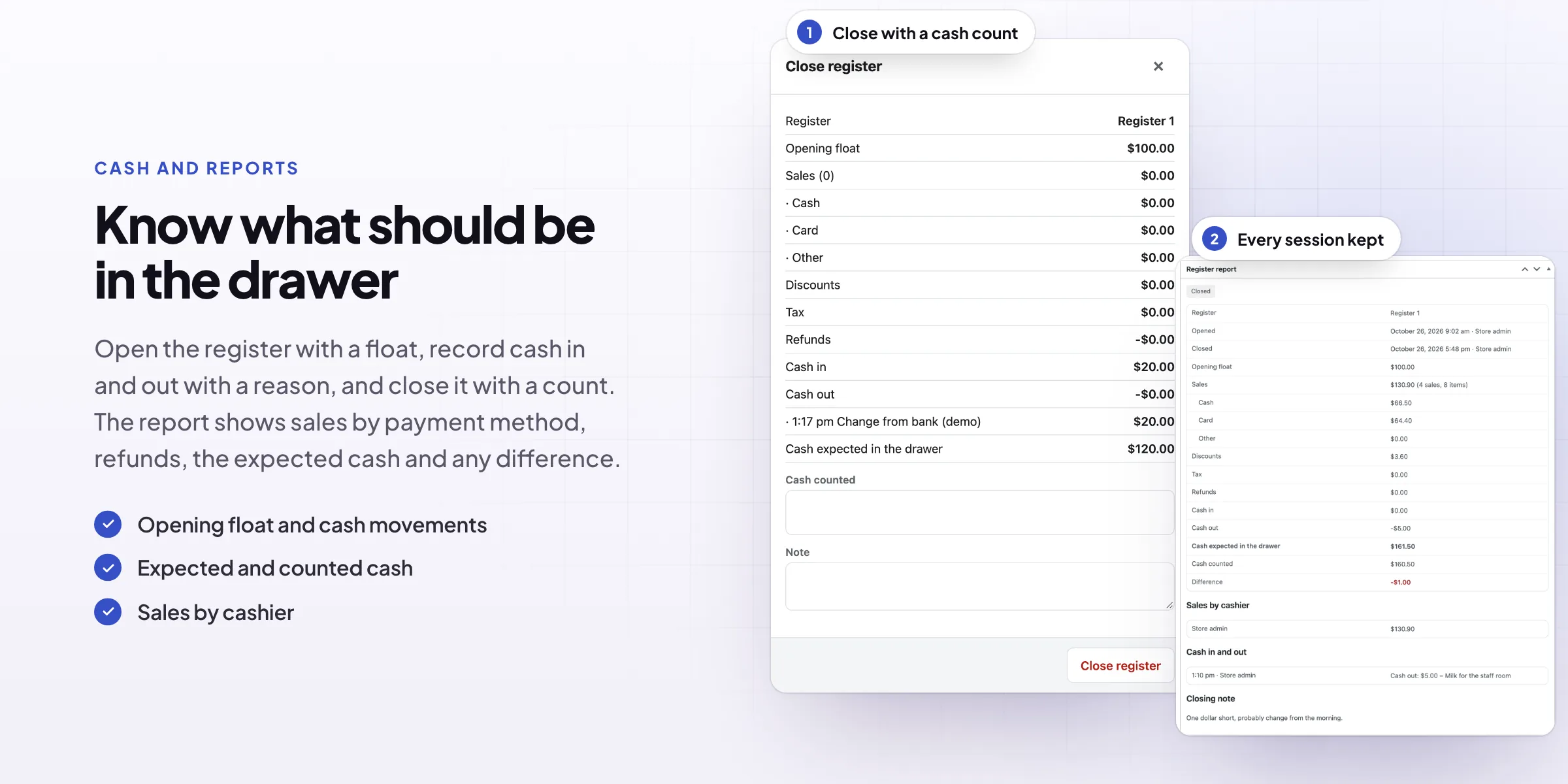
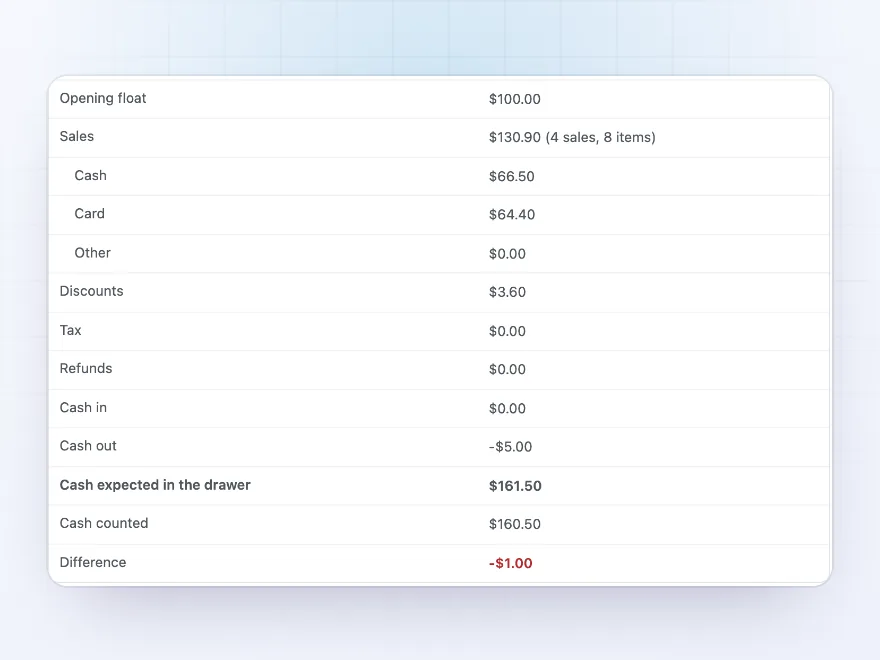
Open the register with a cash float, record cash put in or taken out with a reason, and close it with a cash count. The register report shows sales by payment method, discounts, tax, refunds, cash in and out, the cash expected in the drawer and any difference from your count.
- Opening float and cash in and out
- Expected cash worked out for you
- A difference shown at closing
Orders
Every sale is a WooCommerce order
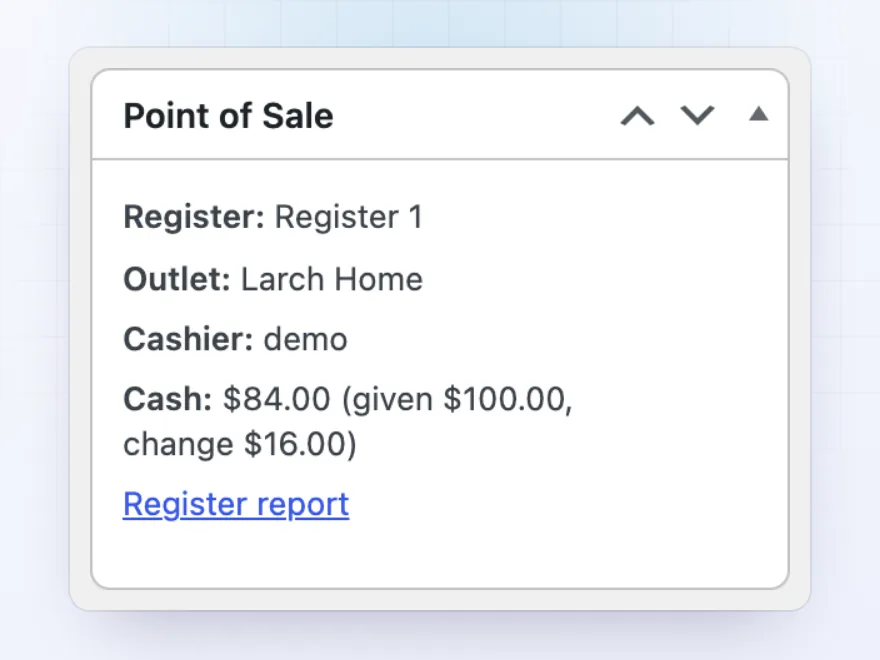
Each sale is saved as a WooCommerce order with the register, outlet, cashier and payment on it, so stock goes down and your reports include the shop. Refund items from a past sale back to stock by cash or card, and reprint or email the receipt.
- Stock shared with the online store
- Register, outlet and cashier on the order
- Refunds back to stock
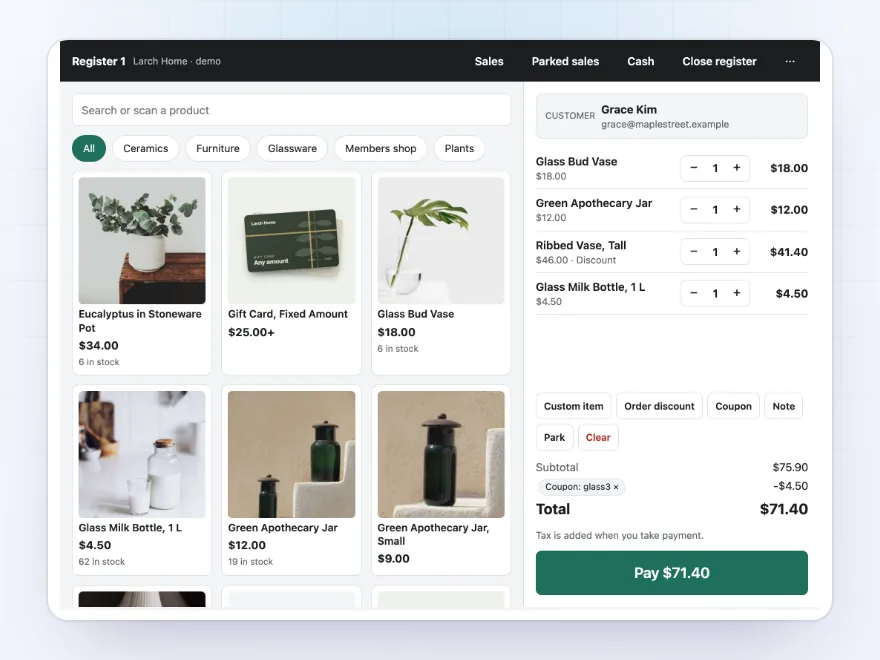
Any device
Laptops, tablets and touch screens
The register runs in the browser on a laptop, a tablet or a touch screen, with no app to install. It keeps the catalog in the browser, so searching and scanning are instant, and sales made while the internet is down are sent when it’s back. A second screen can show customers the sale and the total.
- No app to install
- Keeps selling when the internet drops
- A customer display on a second screen
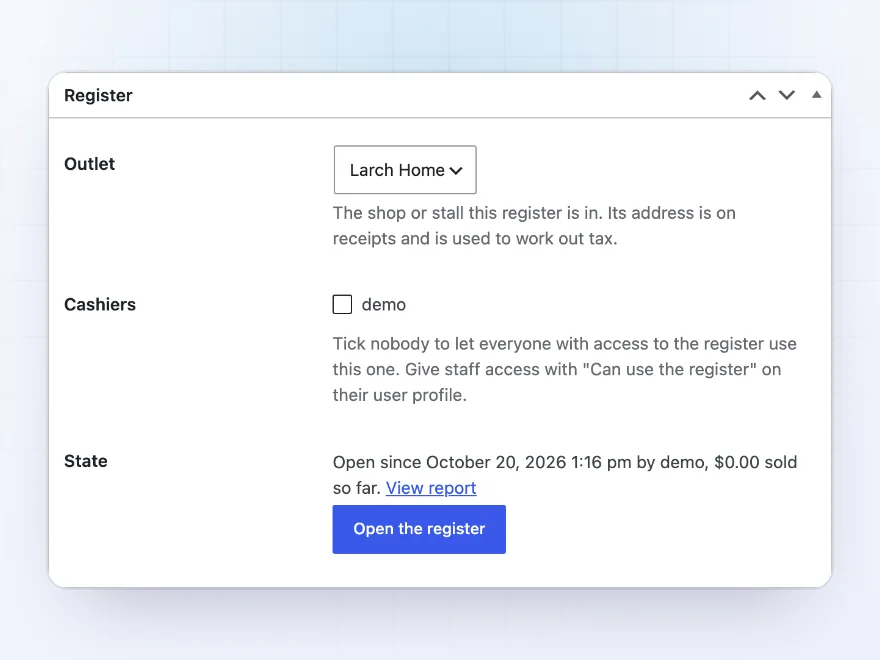
Registers and cashiers
Outlets, registers and who may use them
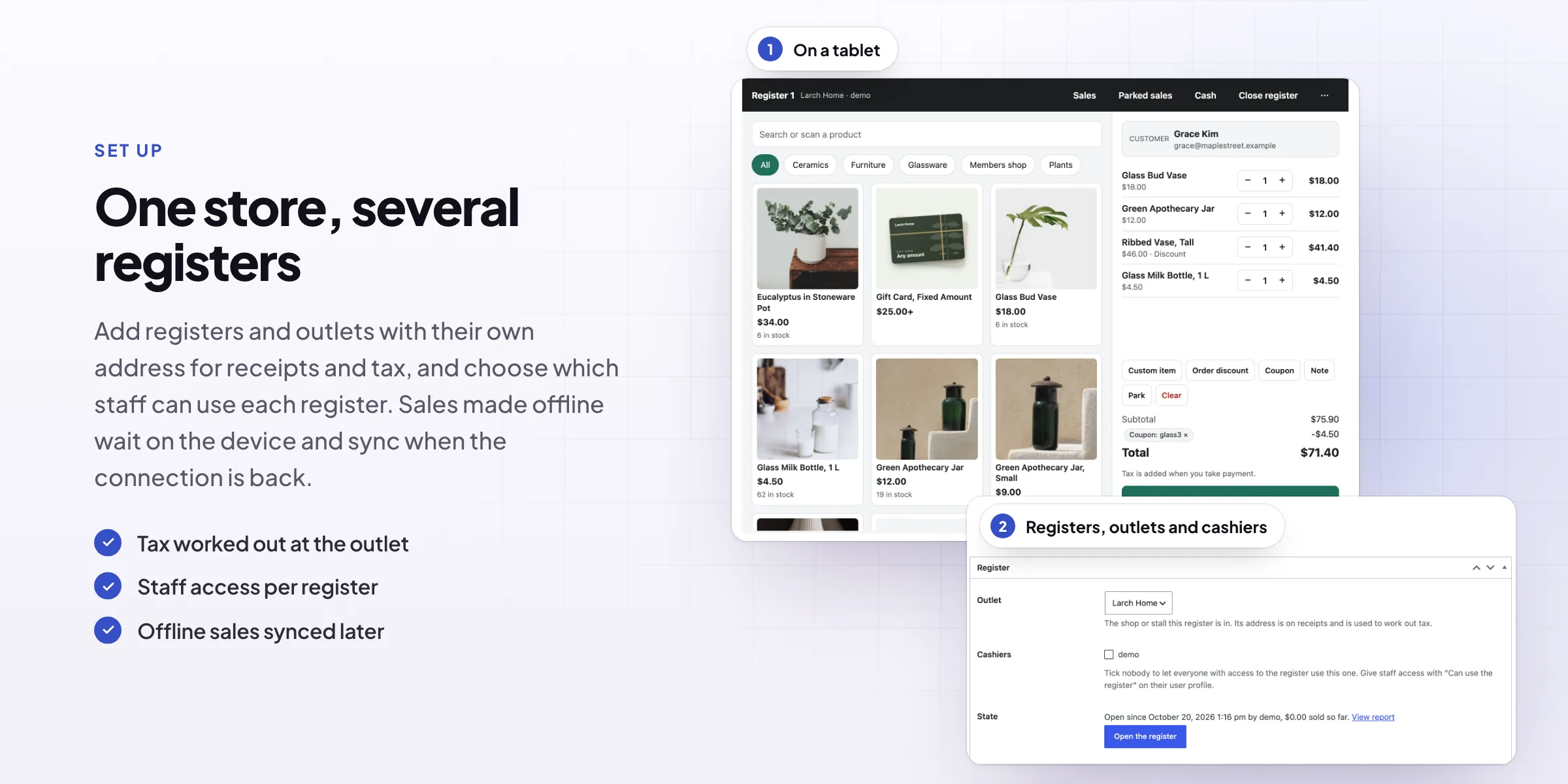
Add an outlet for each shop or stall, with its own address and receipt texts, and registers in each outlet. Choose which cashiers may use each register. Any user can get “Can use the register” on their profile, without other access to the store admin.
- Outlets with their own address
- Cashiers chosen per register
- Register access without admin access
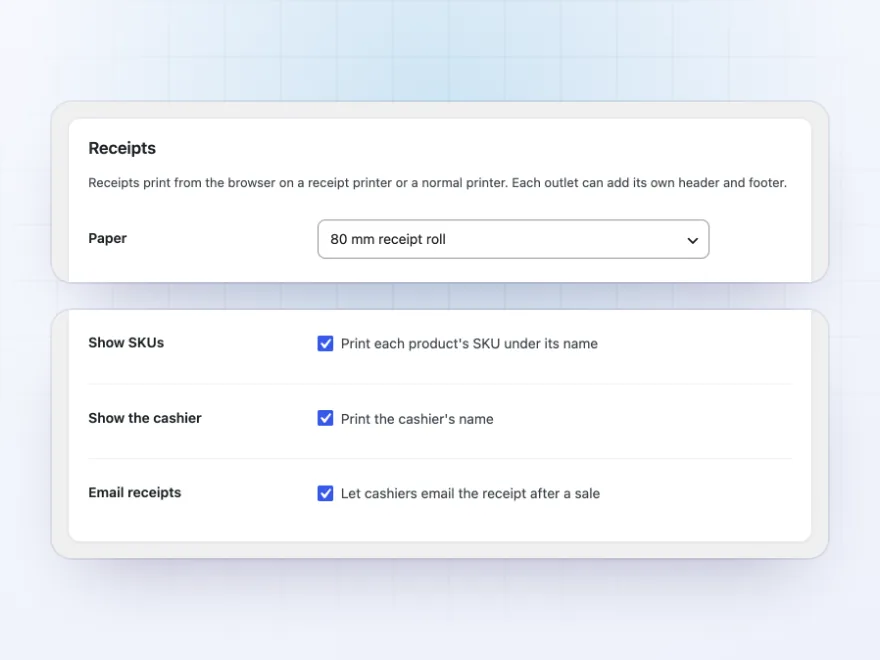
Receipts
Receipts on any printer
Print receipts from the browser on an 80 mm or 58 mm receipt printer or on A4, with your logo, the outlet’s address, a header and footer, SKUs and the cashier. Print gift receipts without prices, reprint old receipts, or email the receipt in your WooCommerce email design.
- 80 mm, 58 mm or A4 paper
- Gift receipts without prices
- Emailed receipts
Premium quality & support
Support you can count on, year after year
See Point of Sale working in a live demo store before you buy. If you need a hand, our friendly support team will help you get it set up, and regular updates keep it working with each new WooCommerce release.
- A live demo store to try it first
- Step-by-step docs with a quick start
- Premium support from a helpful team
- Regular updates included
A WooCommerce POS that shares your stock and orders
Point of Sale for WooCommerce turns a laptop, tablet or touch screen into a till for your shop, market stall or pop-up. The register runs in the browser, so there is nothing to install, and every sale is a WooCommerce order. Stock goes down for the website and the shop at the same time, and reports include both.
As a WooCommerce POS system it covers the counter work: barcode scanning, discounts and coupons, cash with change, card and split payments, receipts on receipt printers or A4, and a cash count when you close the register. This WooCommerce POS plugin also keeps selling when the internet drops and sends the sales once it is back.
Common setups
Questions before you buy
Which barcode scanners work?
Any scanner that types like a keyboard, over USB or Bluetooth. Put the barcode in the product’s GTIN, UPC, EAN or ISBN field, or use the SKU.
Does it connect to card readers?
No. Card payments are taken on your own card terminal and recorded at the register as card.
What happens when the internet drops?
Sales wait in the browser and are sent when the connection is back, so you can keep selling.
Which printers work?
Receipts print from the browser on 80 mm or 58 mm receipt printers or on A4 paper, with your logo, the outlet’s address and your own header and footer.
Do cashiers need access to the store admin?
No. Tick “Can use the register” on a user’s profile and choose which registers they may use.
Are register sales in my WooCommerce reports?
Yes. Each sale is a WooCommerce order, so it counts in reports and lowers stock like an online order.
Does it send WooCommerce’s order emails for each sale?
No. The customer gets the printed or emailed receipt, and no New order email is sent for register sales.
Requirements
- WordPress
- 6.8 or newer
- WooCommerce
- 10.0 or newer
- PHP
- 7.4 or newer
Works with
- Classic themes
- Block themes
- Cart and Checkout blocks
- High-Performance Order Storage




Evi –
Good for markets. The offline mode needed a bit of testing before I trusted it, so four stars.
Wout –
Simple to use for staff who have never used a POS before.
jeroend –
Thomas helped me connect the receipt printer. took ten minutes
Noor –
Markets sorted
We do four markets a month and this replaced our old till.
Fabian –
the split payment option was the reason we bought it. works well with our card reader
Greta –
Used it at a two day market on an iPad. Stock stayed in sync and receipts printed first time.
Femke –
Works well. split payments were the bit i was worried about and they work. James answered my question about receipts
Field & Fable –
Markets are easier
we use it at markets on a tablet and the stock stays in sync with the online shop. Receipts print fine.