 Maxima Plugins
Description
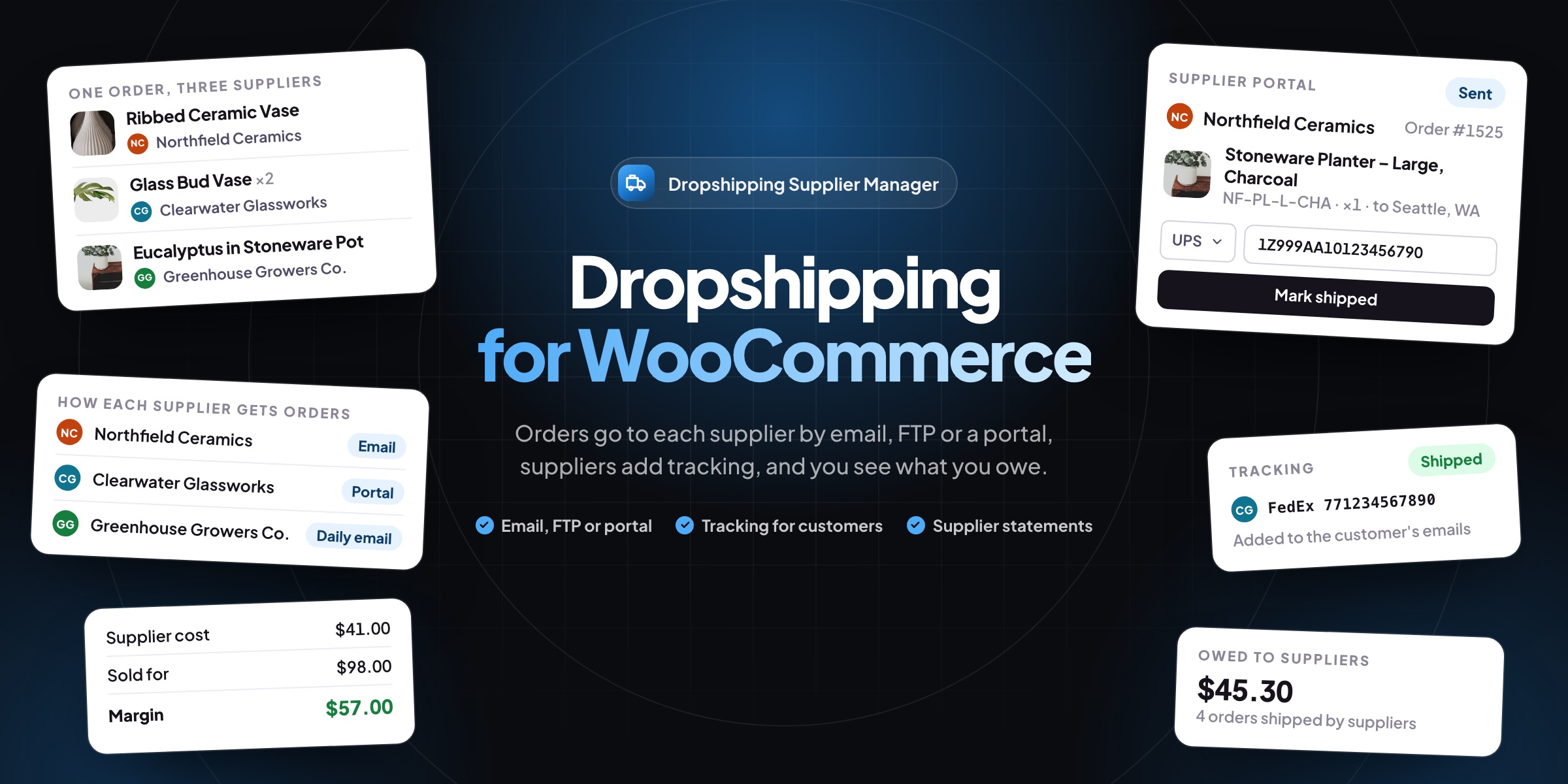
Dropshipping Supplier Manager sends each supplier the items they ship for you as soon as a WooCommerce order is paid. Suppliers get only their own items and the address, mark them shipped with a tracking number, and the customer gets it.
📧 Order emails with the supplier’s SKUs, the address and a CSV file.
🚪 A supplier portal where suppliers mark orders shipped, without admin access.
📁 CSV files by FTP, FTPS or SFTP, with passwords stored encrypted.
📍 Tracking passed on to customers by email and in My Account.
🏷️ A supplier, SKU and cost on every product and variation.
📦 Items split by supplier on the order screen, with the margin on every order.
💰 What you owe each supplier, with statements marked paid in bulk.
📄 Packing slips with your store’s name and no prices, with PDF Invoices.
Orders
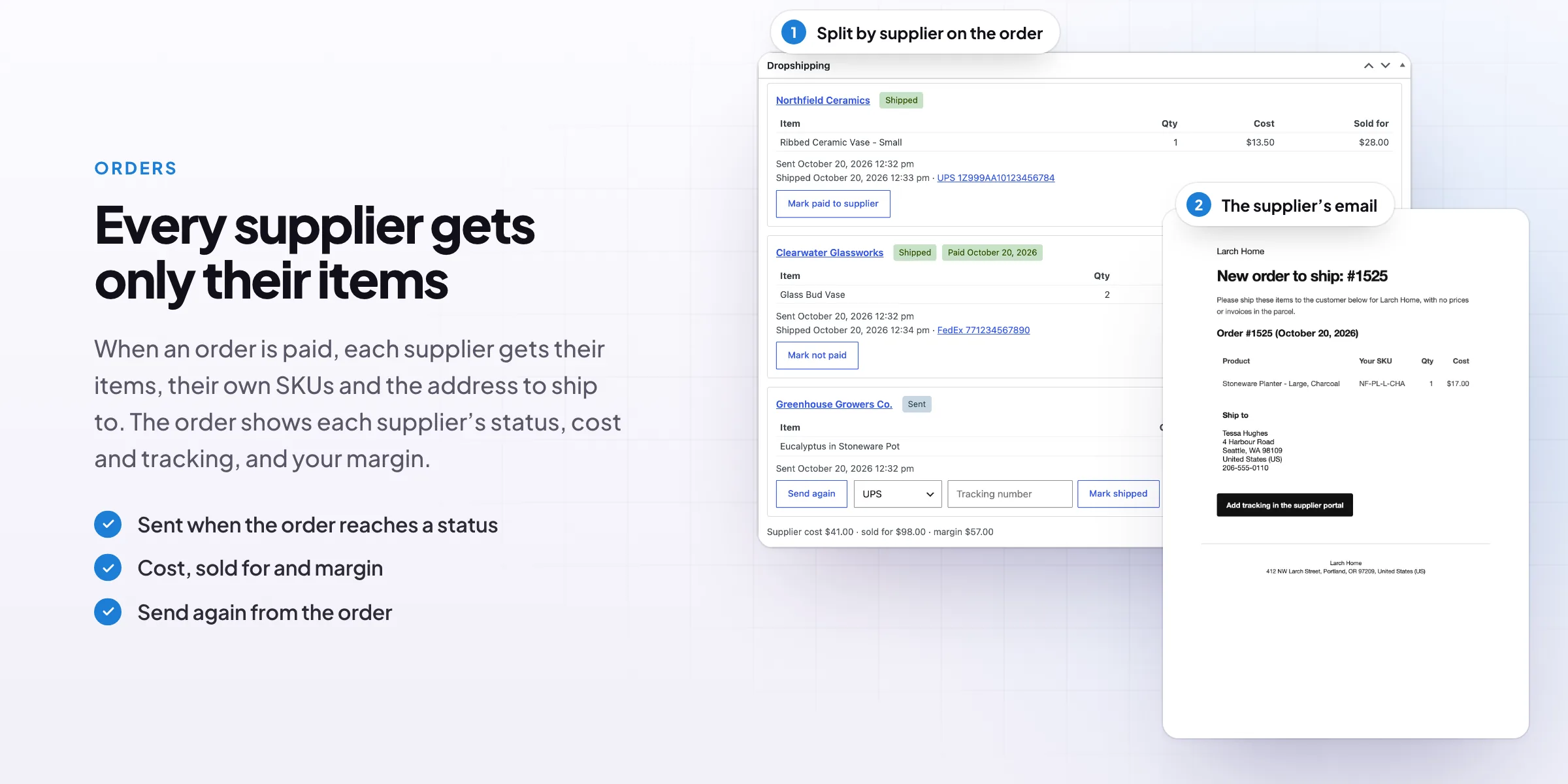
Each supplier’s items on the order screen
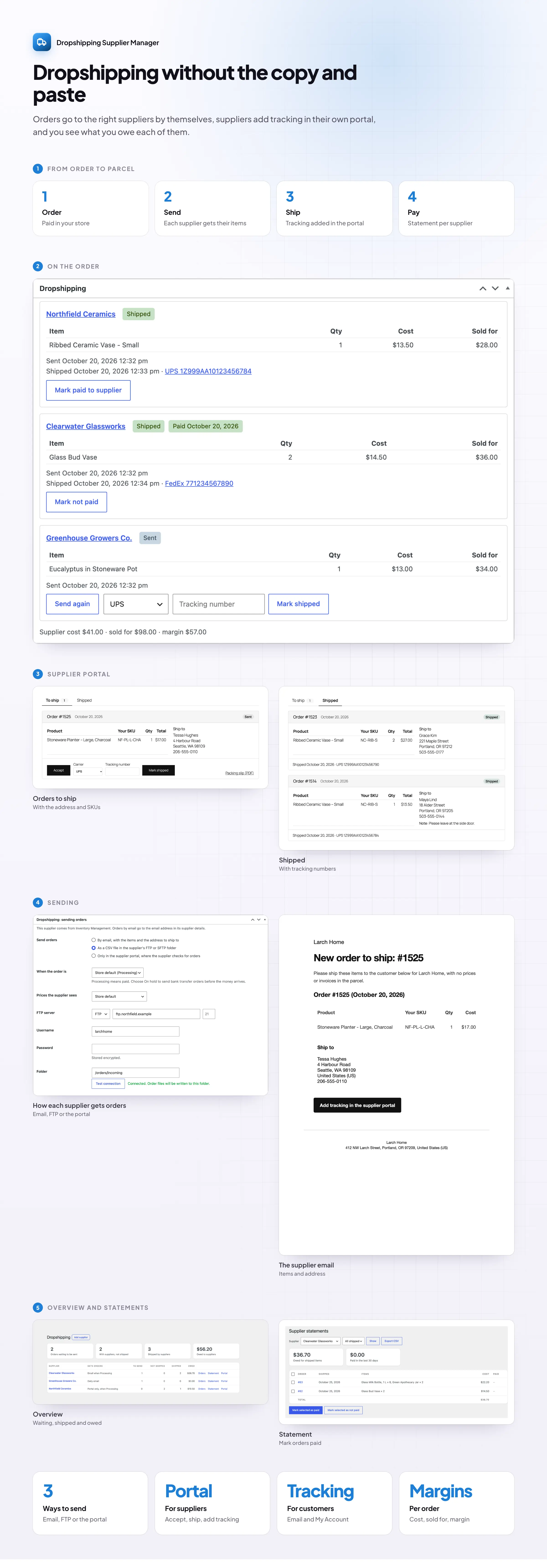
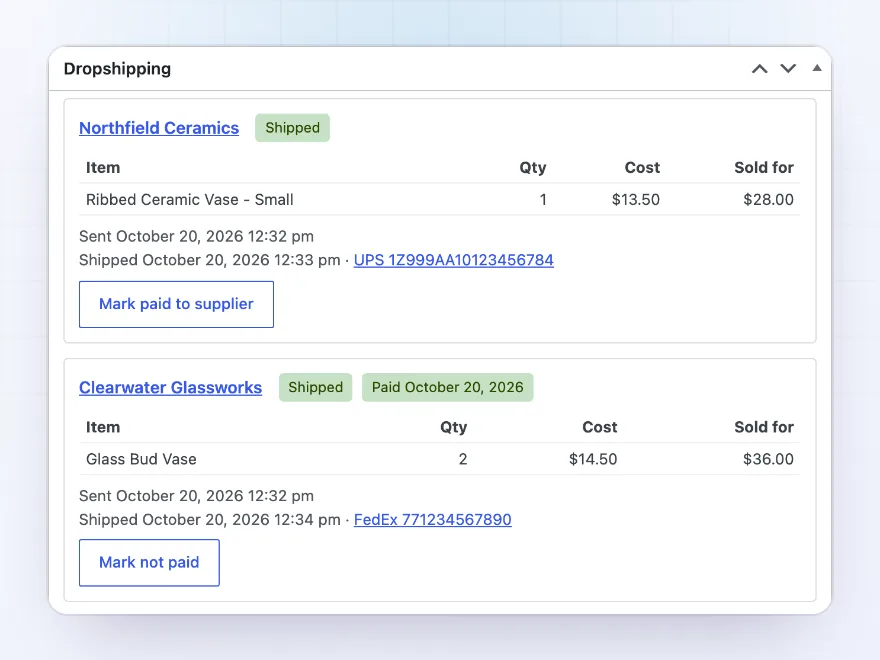
When an order is paid, the items are split by supplier and sent to each one. The order screen shows every supplier’s items with their status, when they were sent and shipped, the tracking number, your cost and the margin. Send again, mark items shipped or mark the supplier paid from the same box.
- Items split by supplier
- Status, tracking and cost per supplier
- The margin on every order
Order emails
An email with the items and the address to ship to
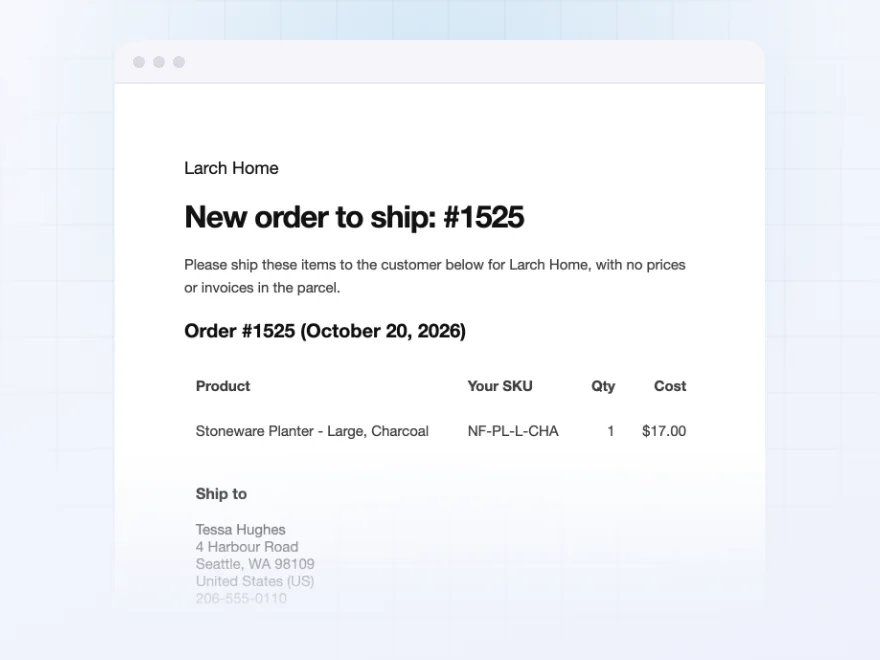
Suppliers get an email with their items, quantities, their own SKUs and the customer’s address, with a CSV file attached. Show them your cost price, the price the customer paid or no prices at all. Suppliers who want one email a day get a daily summary instead.
- Their SKUs and the shipping address
- A CSV file of the items attached
- Cost, customer price or no prices
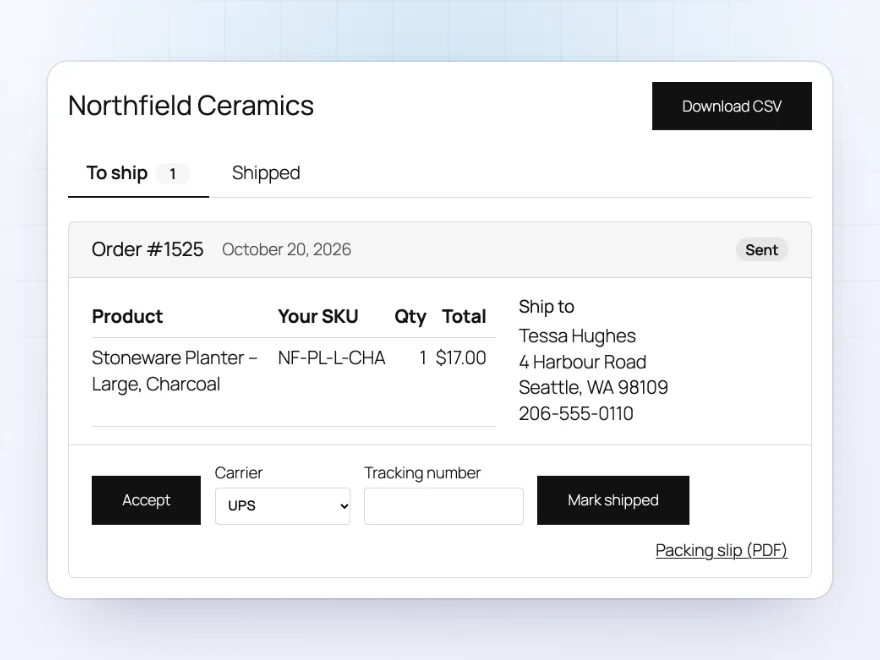
Supplier portal
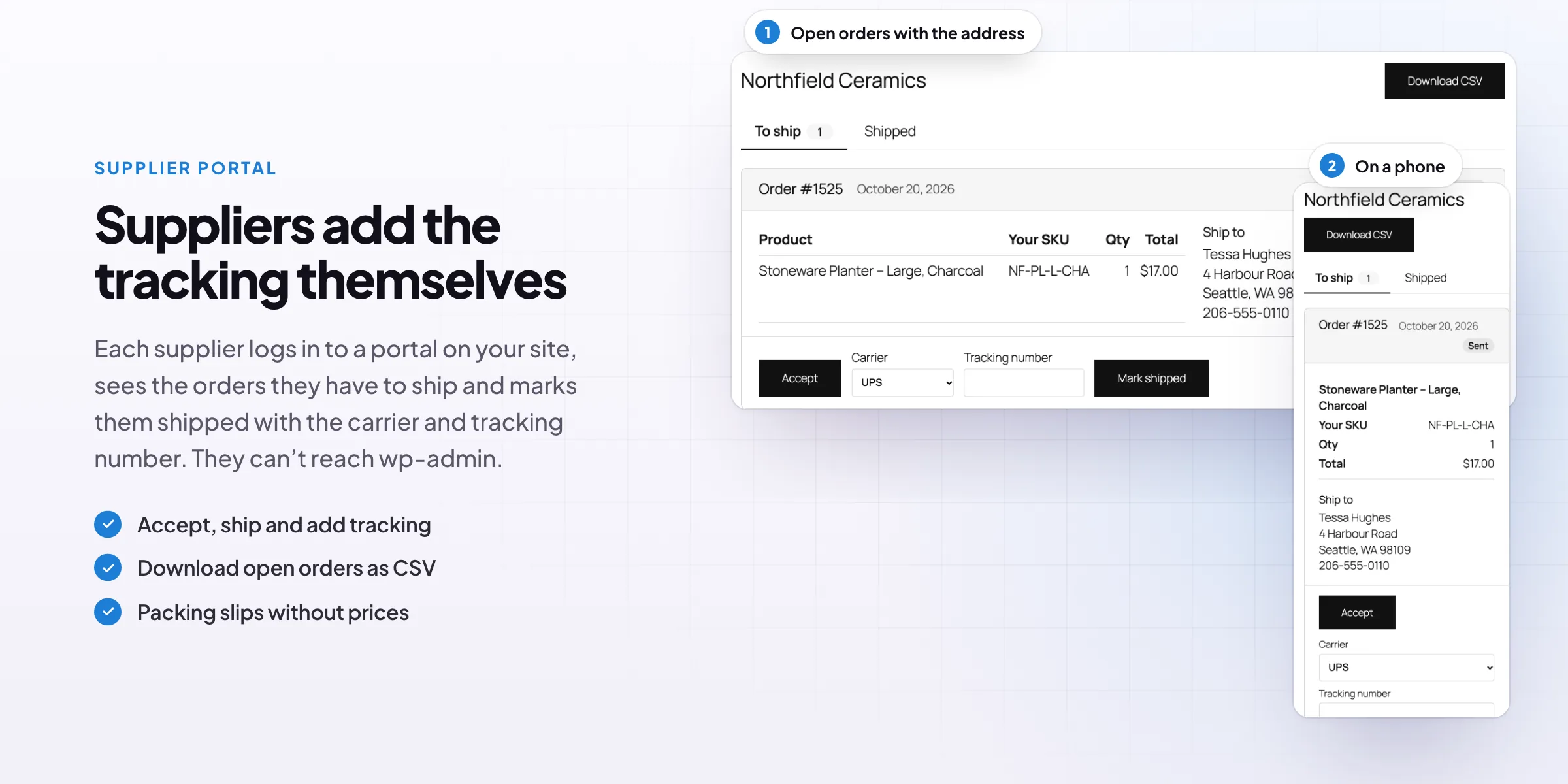
A portal where suppliers mark orders shipped
Each supplier gets a login to a portal on your site, without access to wp-admin. They see their open orders with the items and the address, download them as CSV, accept orders and mark them shipped with the carrier and tracking number.
- A login without admin access
- Accept and mark shipped
- Open orders as CSV
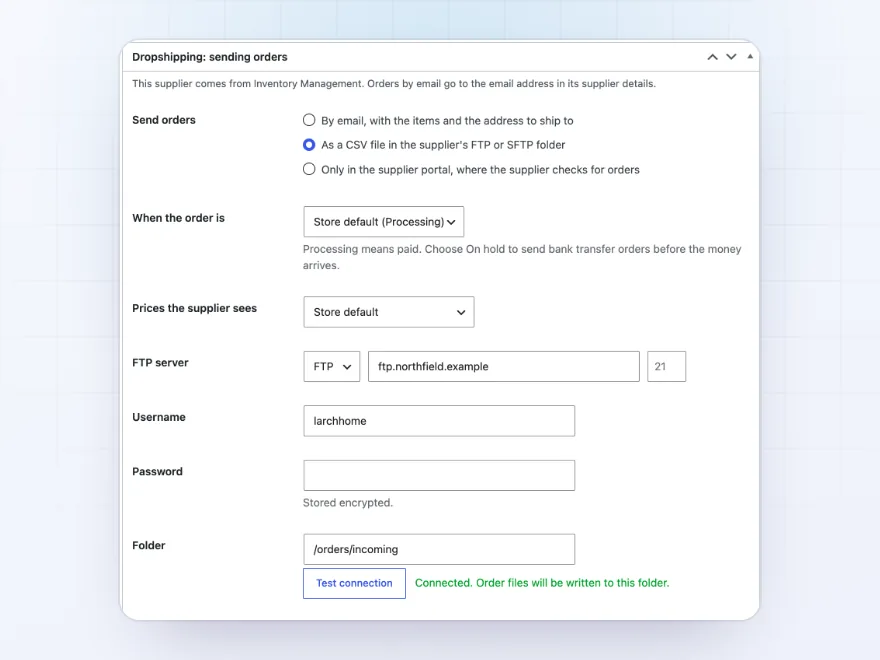
CSV by FTP
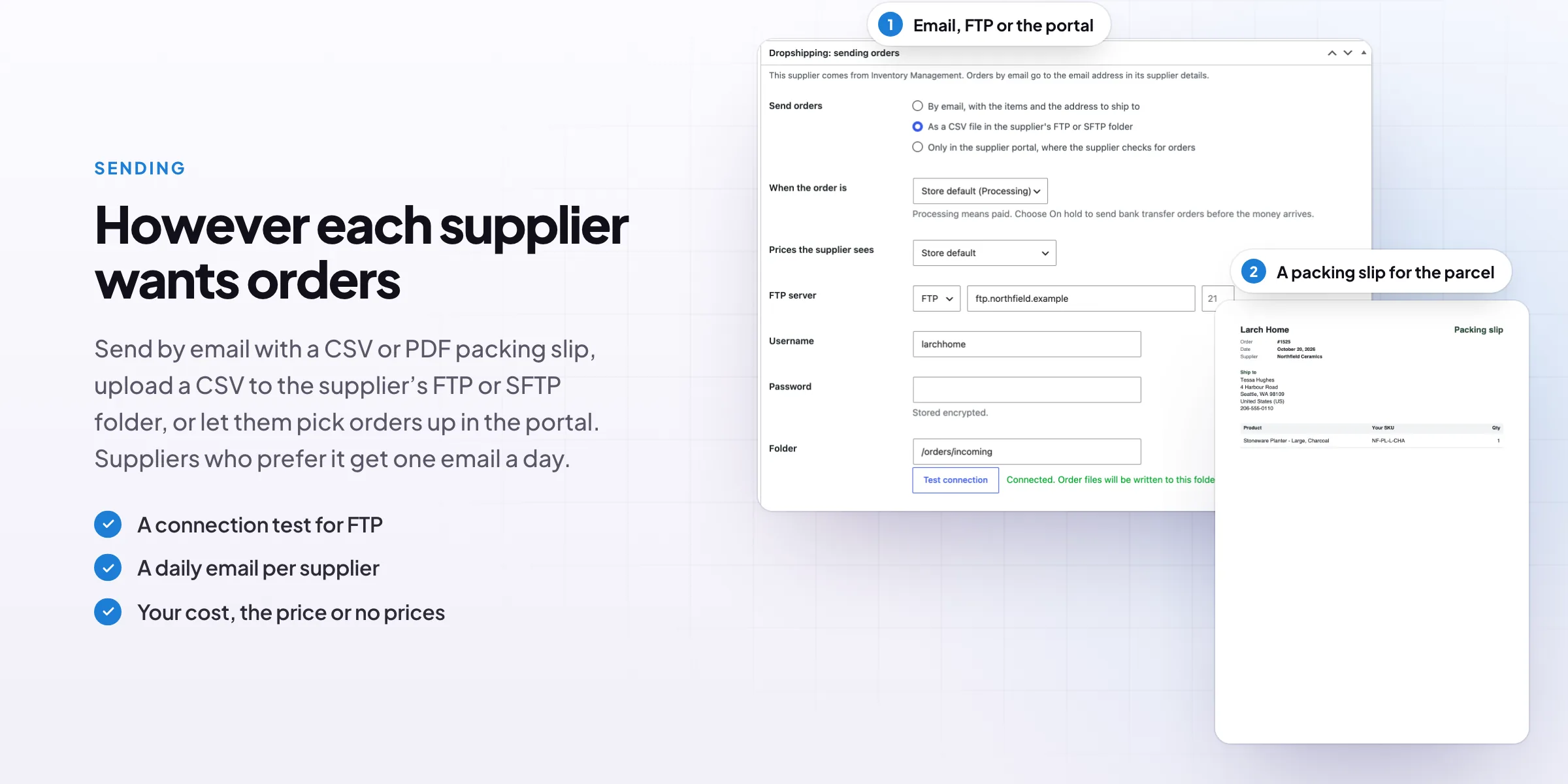
Order files on the supplier’s FTP server
For suppliers who read orders from a folder, each order is written as a CSV file to their FTP, FTPS or SFTP server. Test the connection on the supplier screen before the first order. Passwords are stored encrypted.
- FTP, FTPS or SFTP
- A connection test
- Passwords stored encrypted
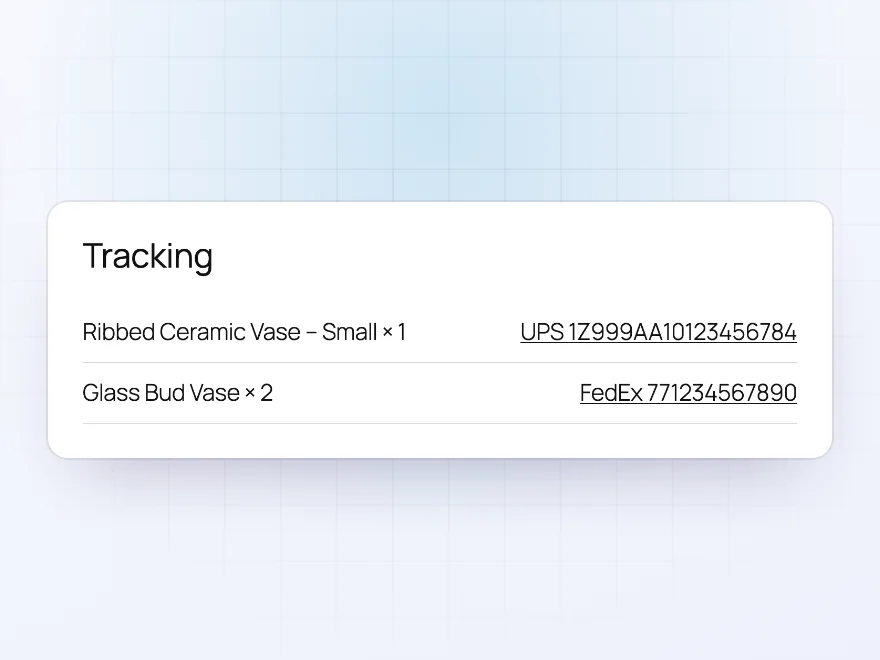
Tracking
Tracking numbers passed on to customers
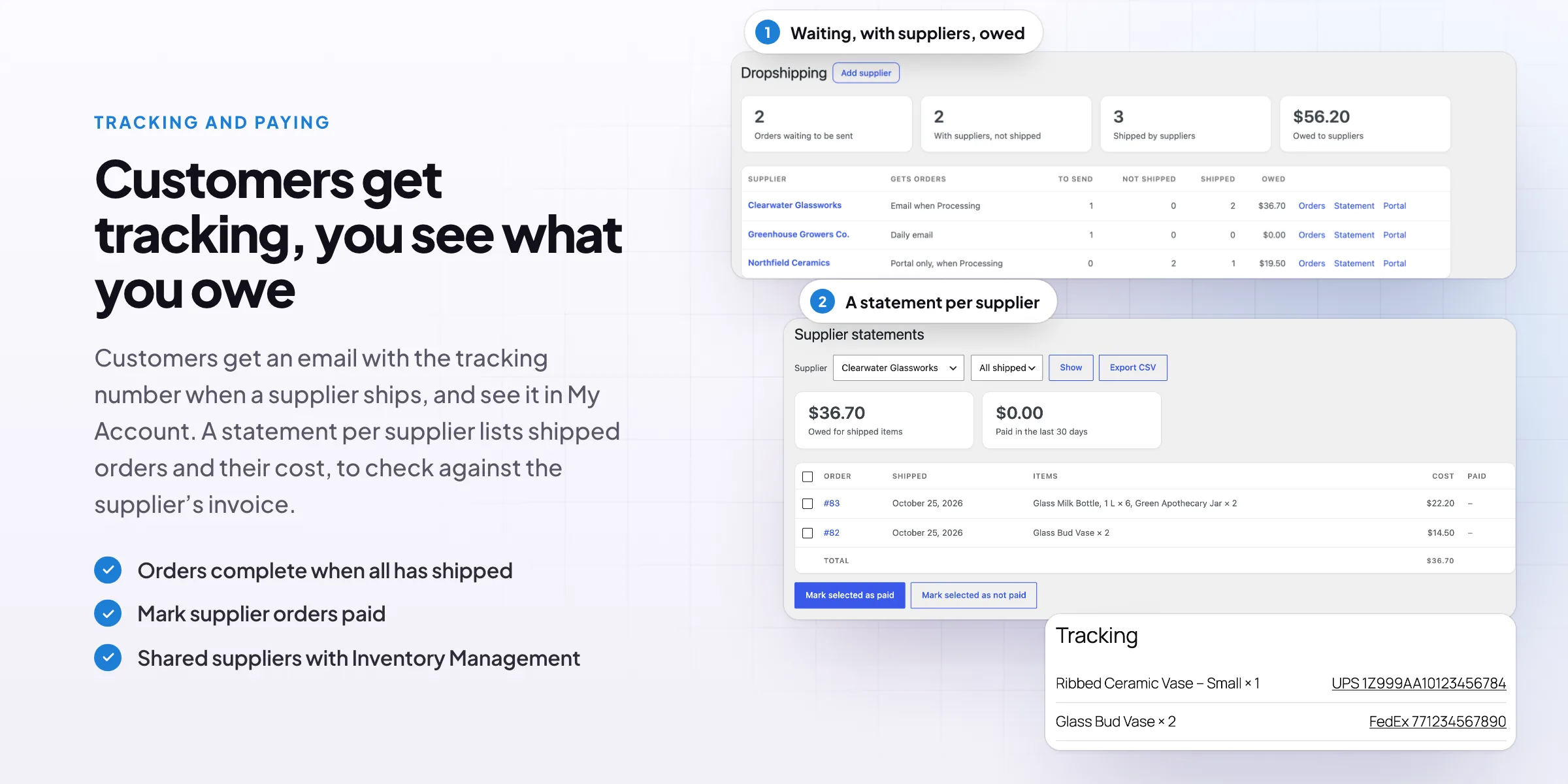
When a supplier ships, the customer gets an email with the carrier and tracking number, and sees tracking in their order emails and in My Account. The order completes by itself when every item has shipped from its supplier.
- A shipped email with tracking
- Tracking in My Account
- Orders complete when all items ship
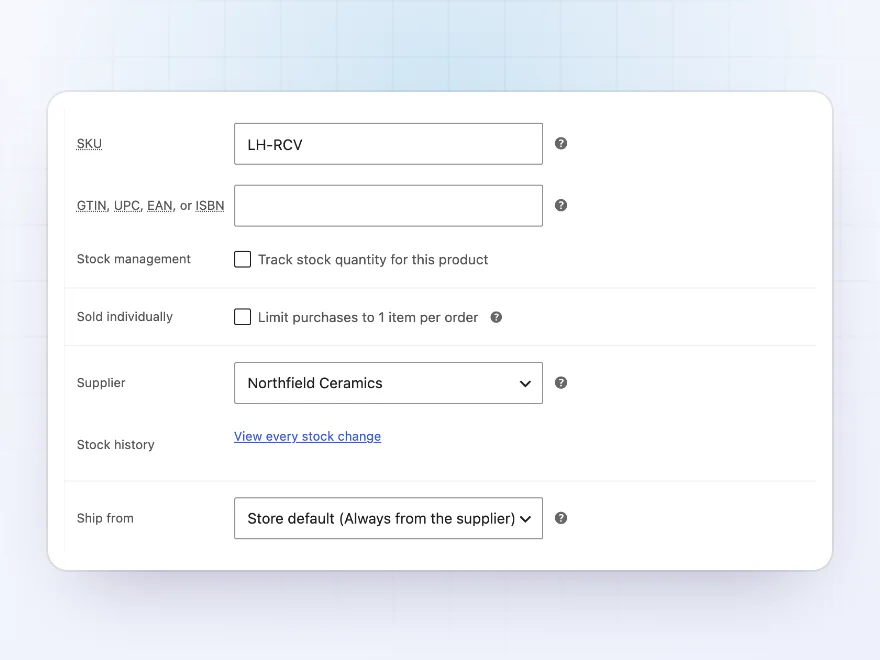
Suppliers and costs
A supplier, SKU and cost on every product
Each product gets a supplier, the supplier’s SKU and your cost price, with a different SKU and cost per variation. Give every product in a category a supplier in one go. A product can always ship from the supplier, only when you’re out of stock, or from your own stock.
- A different SKU and cost per variation
- A whole category in one go
- Supplier only when you’re out of stock
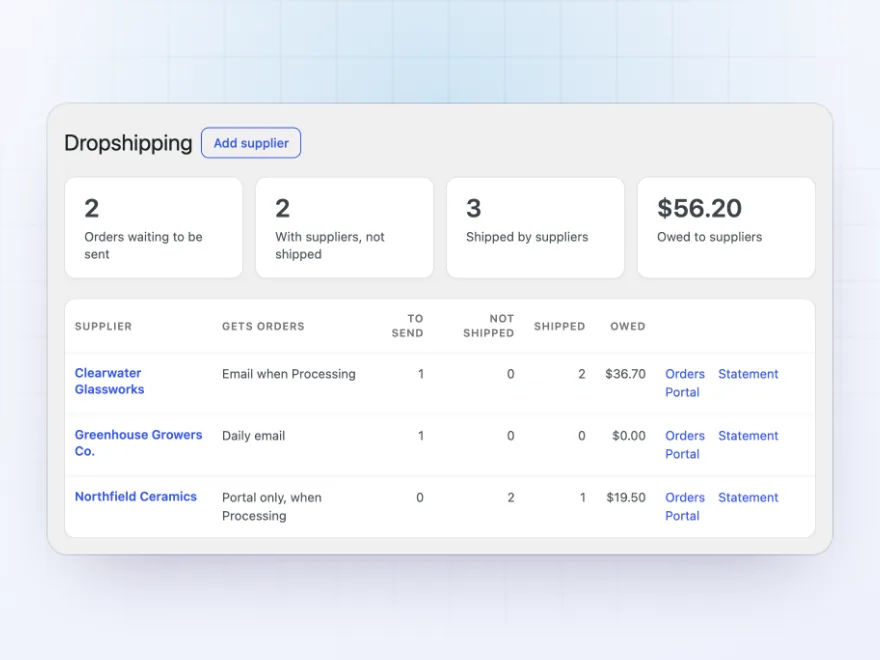
Overview
What’s waiting, what’s shipping and what you owe
The overview shows orders waiting to be sent, items suppliers still have to ship, and what you owe each supplier, with links to each supplier’s orders, statement and portal. Filter the orders list by supplier and dropship status.
- Orders waiting to be sent
- Items not shipped yet
- What you owe each supplier
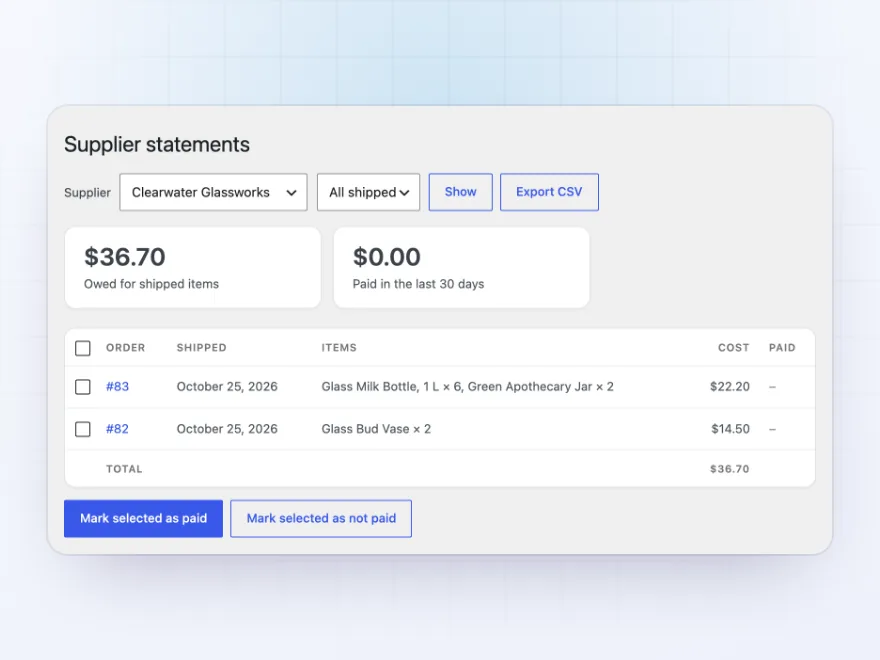
Statements
A statement per supplier, ready to check
Each supplier has a statement of shipped orders with their cost. Mark orders paid in bulk when you pay the supplier, and export the statement to CSV to check it against their invoice. The order screen shows which suppliers are paid.
- Shipped orders with their cost
- Marked paid in bulk
- CSV to check against invoices
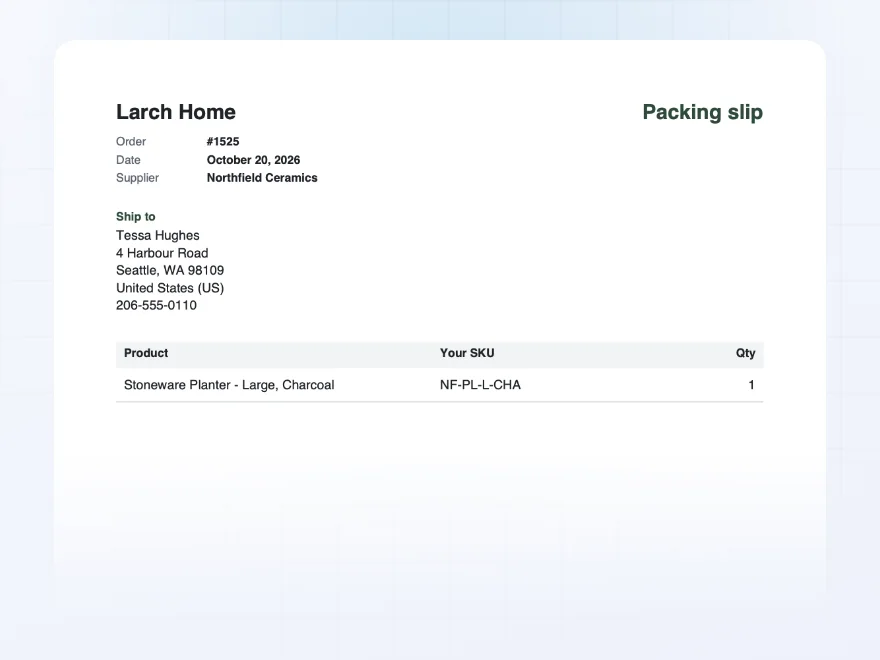
With PDF Invoices
Packing slips with your store’s name
With PDF Invoices & E-Invoicing active, suppliers get a packing slip with your store’s name, the order and the address, without prices, attached to the order email or downloaded from the portal, so the parcel looks like it came from you.
- Your store’s name on the slip
- No prices
- In the email or the portal
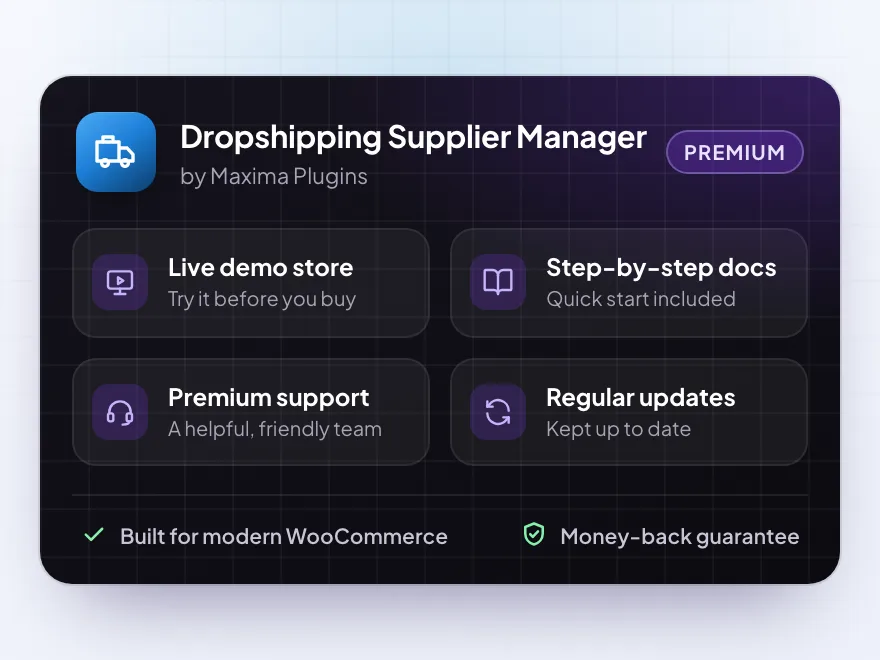
Premium quality & support
Support you can count on, year after year
See Dropshipping Supplier Manager working in a live demo store before you buy. If you need a hand, our friendly support team will help you get it set up, and regular updates keep it working with each new WooCommerce release.
- A live demo store to try it first
- Step-by-step docs with a quick start
- Premium support from a helpful team
- Regular updates included
WooCommerce dropshipping with your own suppliers
Dropshipping Supplier Manager handles WooCommerce dropshipping for stores that work with their own suppliers and wholesalers. When an order is paid, each supplier gets only their own items with the address to ship to, by email, as a CSV file on their FTP server, or in a supplier portal on your site.
Unlike WooCommerce dropshipping plugins that import products from a marketplace, it is about the orders: suppliers mark items shipped with a tracking number, customers get the tracking, and the order completes when everything has shipped. Dropshipping with WooCommerce stays easy to check, with your cost and margin on every order and a statement of what you owe each supplier.
Common setups
Questions before you buy
When does a supplier get an order?
When the order reaches the status you choose, Processing by default. Bank transfer orders wait on On hold until you mark them paid.
What if an order has items from two suppliers and some of my own?
Each supplier gets only their own items. The items you ship yourself stay with you.
Does the supplier see my prices?
Choose per supplier: your cost price, the price the customer paid, or no prices.
Is SFTP supported?
Yes, when the server has the PHP ssh2 extension. FTP and FTPS work on most servers.
Is a supplier told when an order is cancelled?
Yes. Suppliers get an email when an order they have is cancelled.
Does it import supplier products?
No. It sends orders to suppliers. To update stock and prices from a supplier’s CSV feed, pair it with Product Import Export.
Does it work with Inventory Management?
Yes. Suppliers, supplier SKUs and cost prices are shared, so there is one supplier list.
Requirements
- WordPress
- 6.8 or newer
- WooCommerce
- 10.0 or newer
- PHP
- 7.4 or newer
Works with
- Classic themes
- Block themes
- Cart and Checkout blocks
- High-Performance Order Storage
SFTP needs the PHP ssh2 extension.




oscar_d –
the portal is good but the supplier onboarding emails are quite plain. it works, four stars
Malin –
Portal took a week
We moved three suppliers onto the portal in a week. They picked it up quickly.
Thea –
The FTP export runs every night. Took a bit to map the columns but it has been solid since.
hvanloon –
each supplier sees only their own products and uploads tracking there. saves us a lot of email
mikep –
Support was helpful
Michael helped me set up the FTP export. took a couple of tries but fine now
Zoe K. –
Tracking numbers come back to the customer automatically. Works well.
Arjen –
Suppliers only see their items
each supplier only sees their own items, which was the main thing. The portal saves us a lot of emails.