 Maxima Plugins
Description
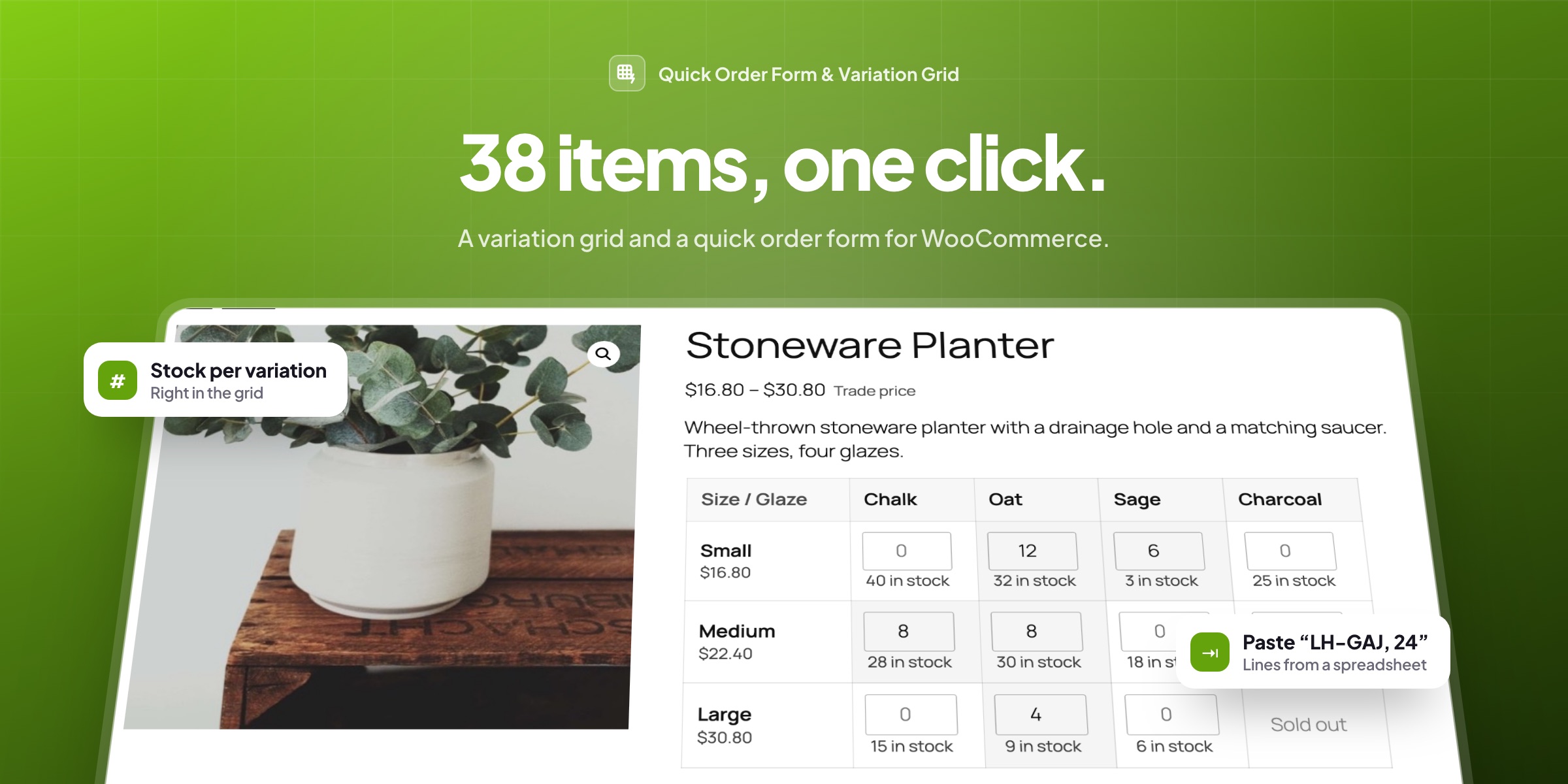
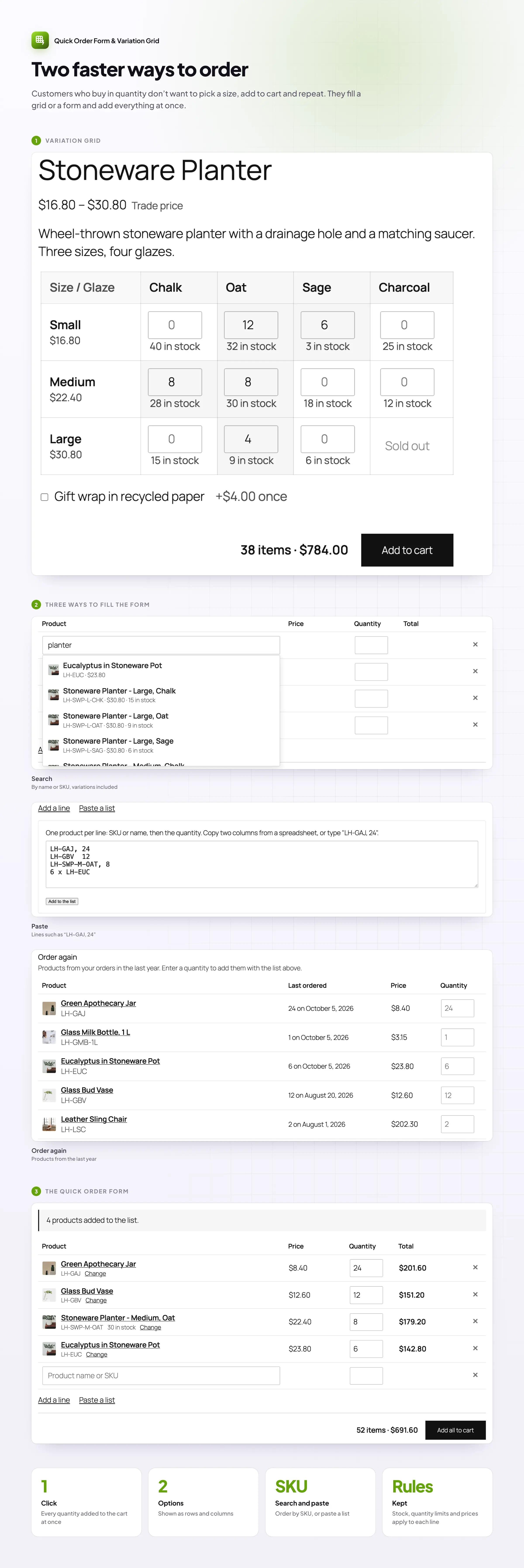
Customers who buy in quantity don’t want to pick a size, add to cart, pick the next size and add again. Quick Order Form & Variation Grid gives them two faster ways to order: a variation grid on the product page, and a bulk order form for whole lists of products.
Variation grid
Every size and color on one grid
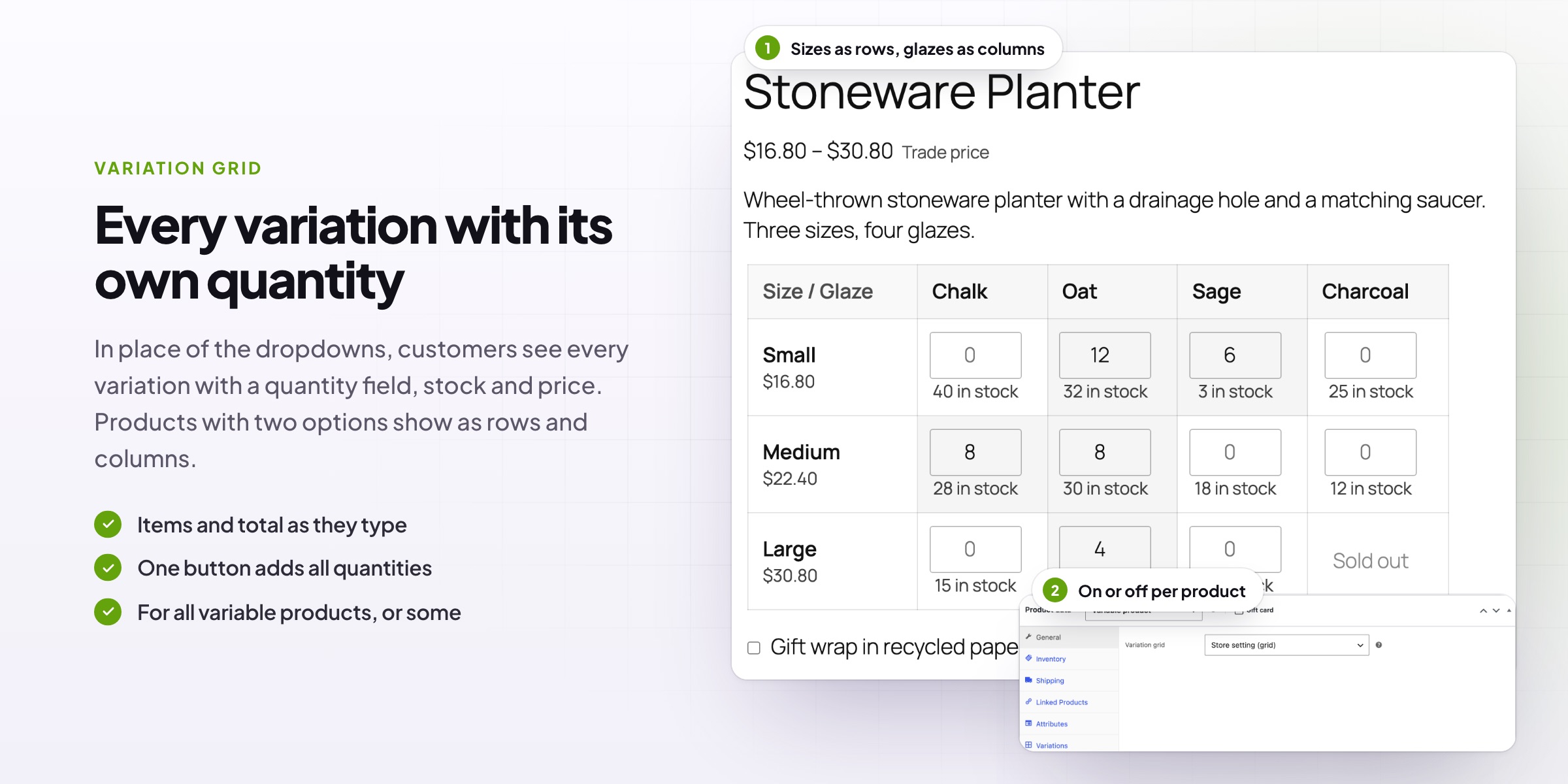
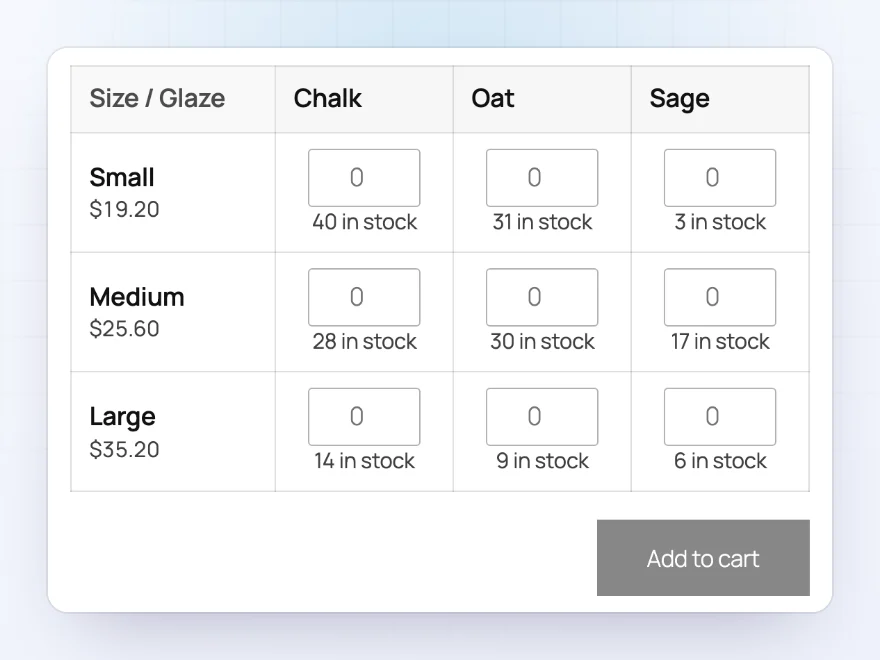
Replace the dropdowns on variable products with a grid where every variation has its own quantity box. Products with two options, such as size and glaze, show as rows and columns, with the price and stock in each cell. Customers fill in the quantities they want and add everything to the cart with one button.
- The number of items and the total update as customers type
- Sold-out variations shown as sold out, or left out
- A search box above long grids
Your columns
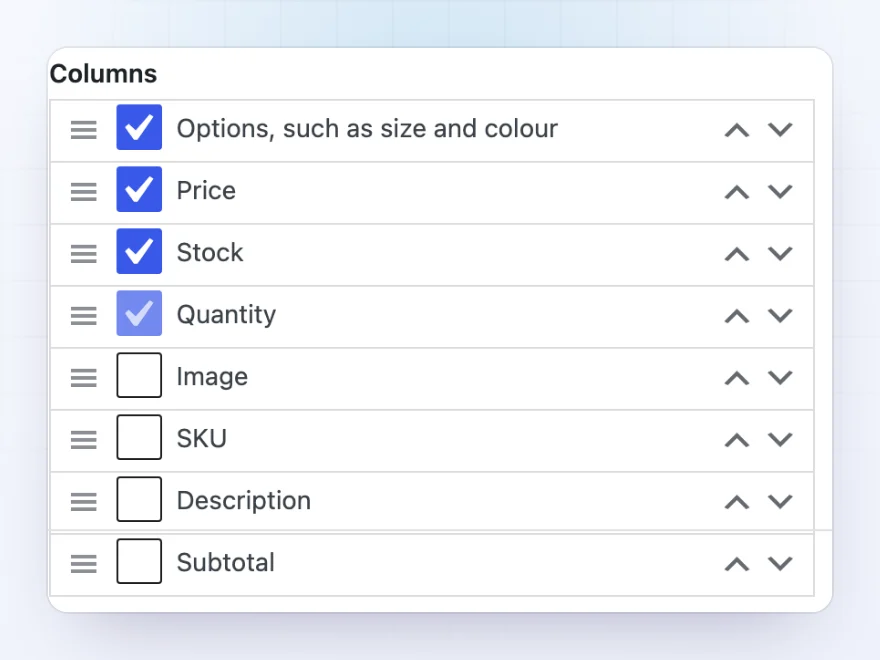
Show the details your buyers need
Choose the columns of the grid and their order: options, image, SKU, description, price, stock, quantity and subtotal. Turn the grid on for all variable products and change it per product, or show a product’s grid on any page with the Variation grid block.
- Drag columns into order
- Thumbnails for variations with their own picture
- A Variation grid block for any page
Quick order form
A whole order on one page
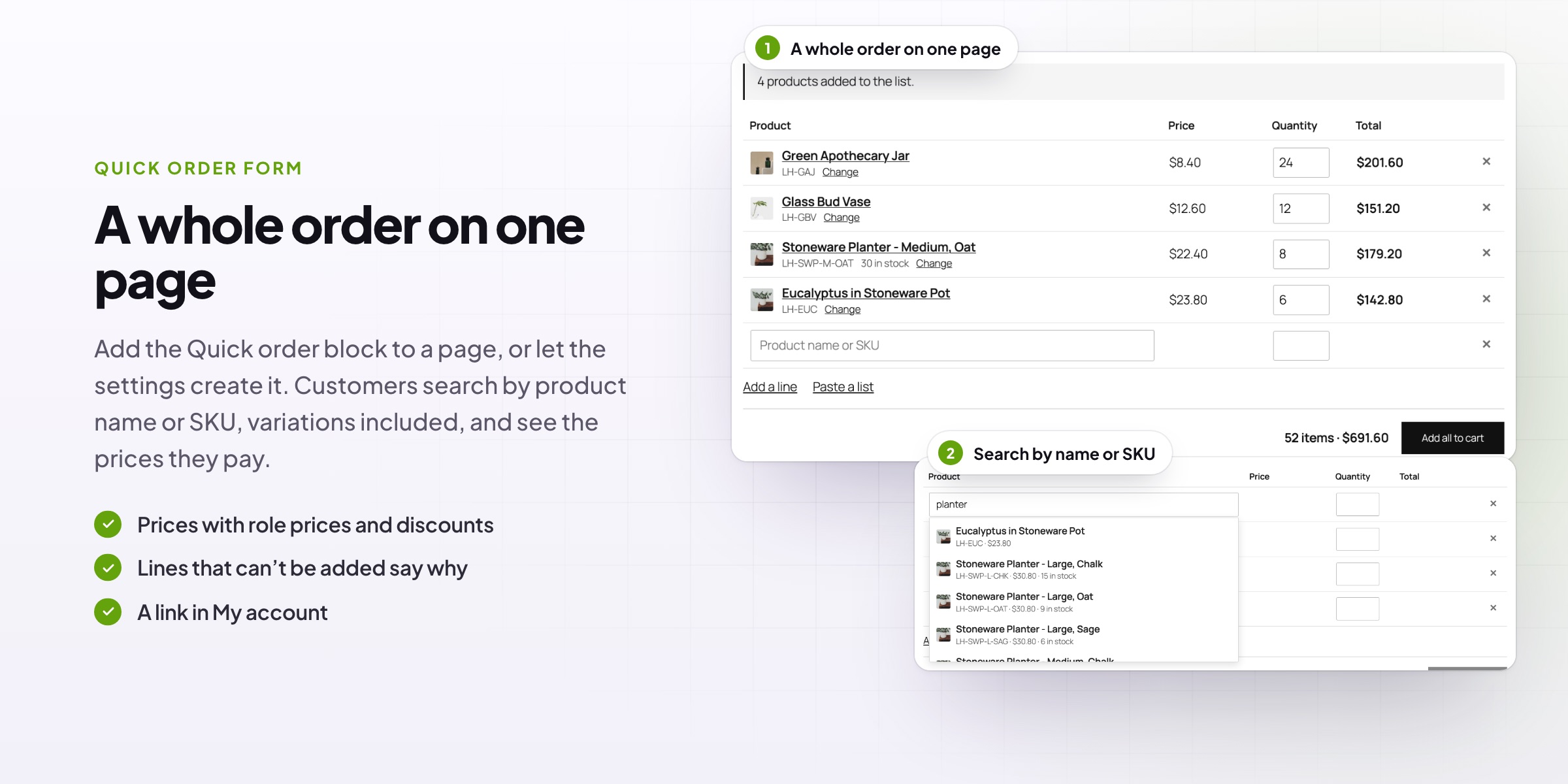
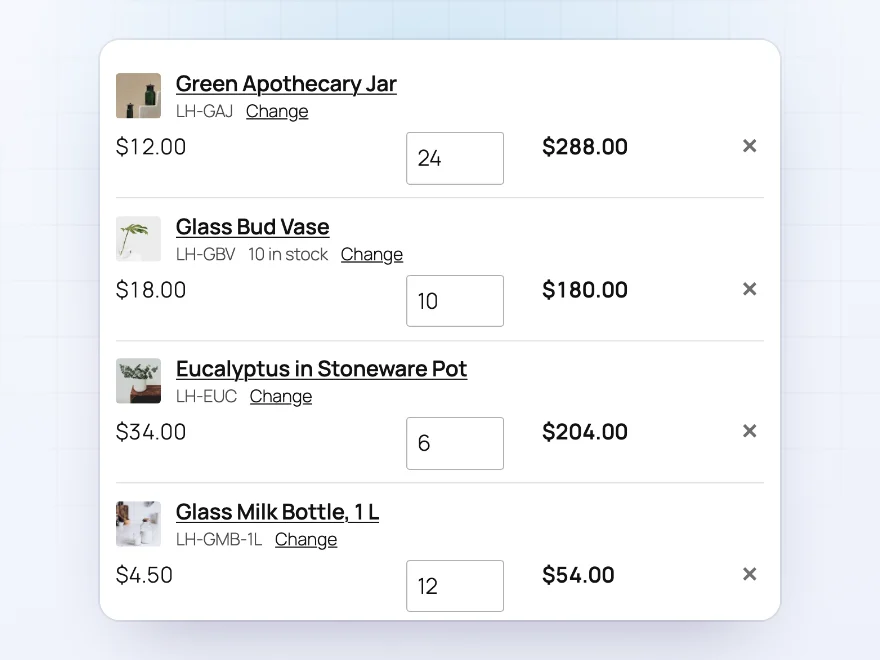
Add a quick order form to a page of its own, where customers search for products by name or SKU and enter a quantity on each line. Prices show as the customer pays them, including trade prices, and everything goes into the cart in one go. A button in the settings creates the page for you.
- Search by name or SKU, variations included
- A running total of items and value
- Choose who can use it: guests, customers or some roles
Paste a list
Paste an order from a spreadsheet
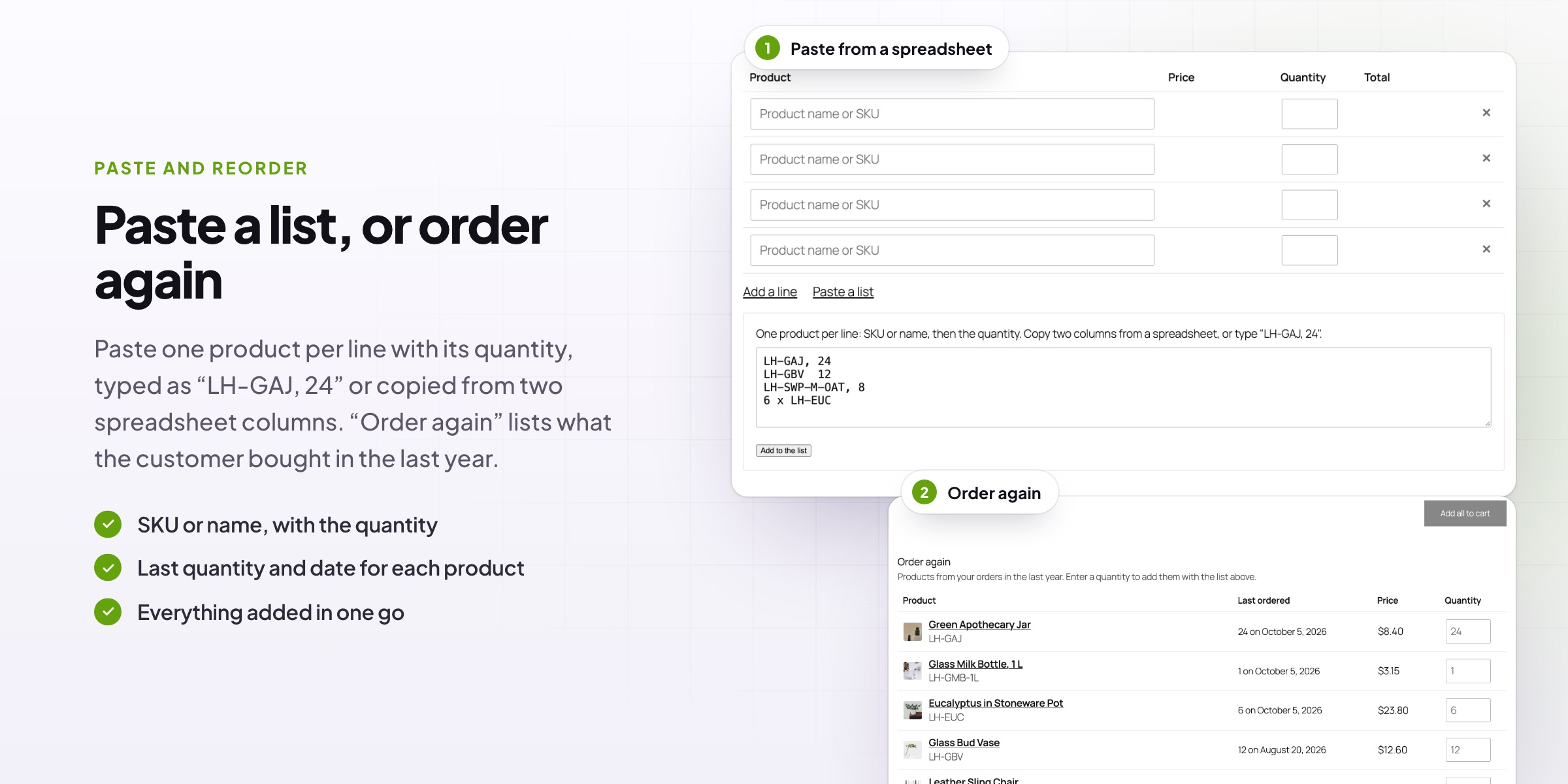
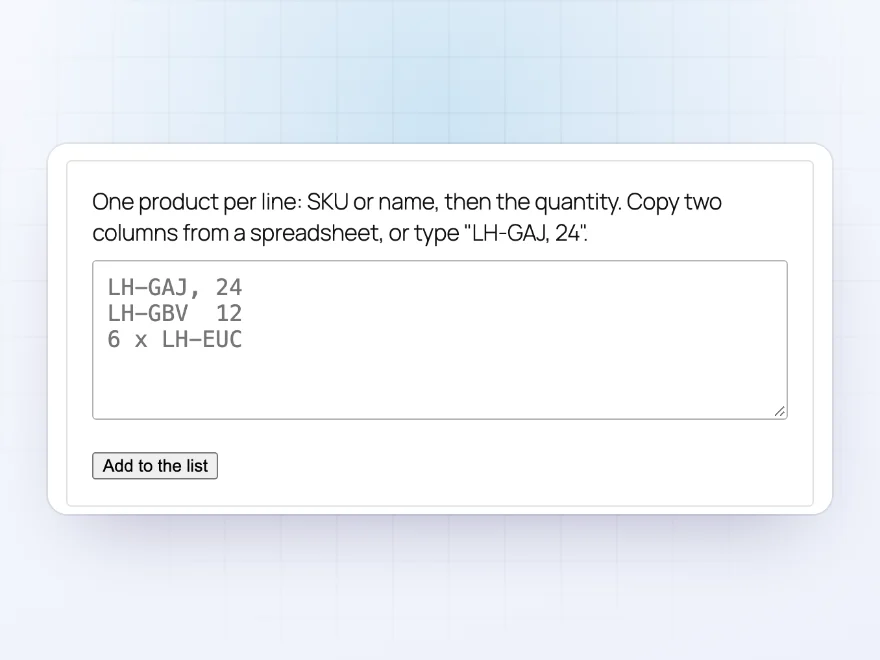
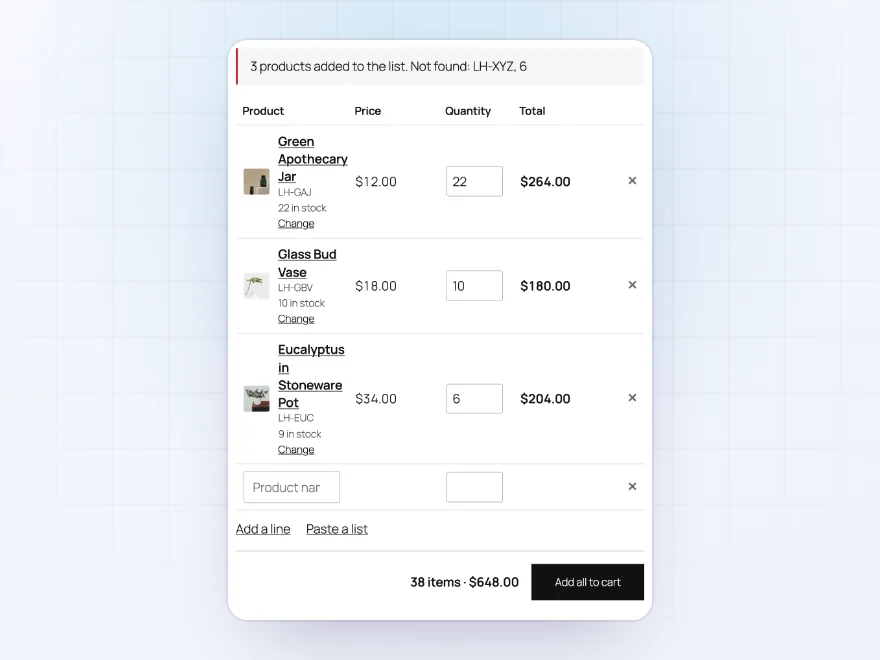
Buyers who keep their orders in a spreadsheet can paste them straight in: one product per line with its quantity, typed as “LH-GAJ, 24” or copied from two columns. The lines are added to the form, ready to check and send to the cart.
- SKU or product name, then the quantity
- Copied from two spreadsheet columns
- Lines that can’t be added say why
Order again
Reorder in seconds
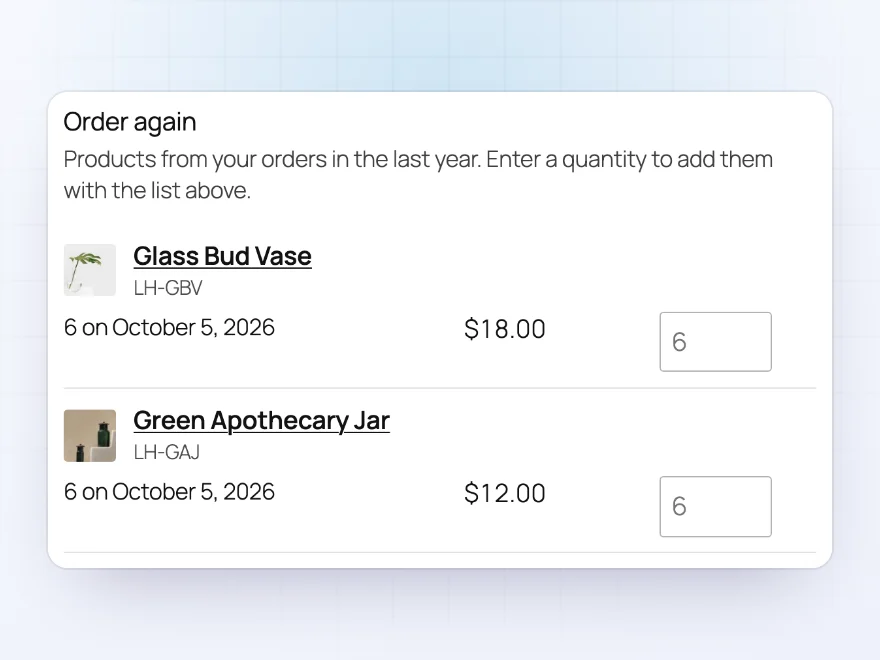
Logged-in customers see the products they ordered in the last year, with the last quantity and date, right under the form. They enter a quantity next to the products they need again, and add them with the rest of the list.
- Products from the last year’s orders
- The last quantity and order date
- Added together with the rest of the list
Product search
Find products by name or SKU
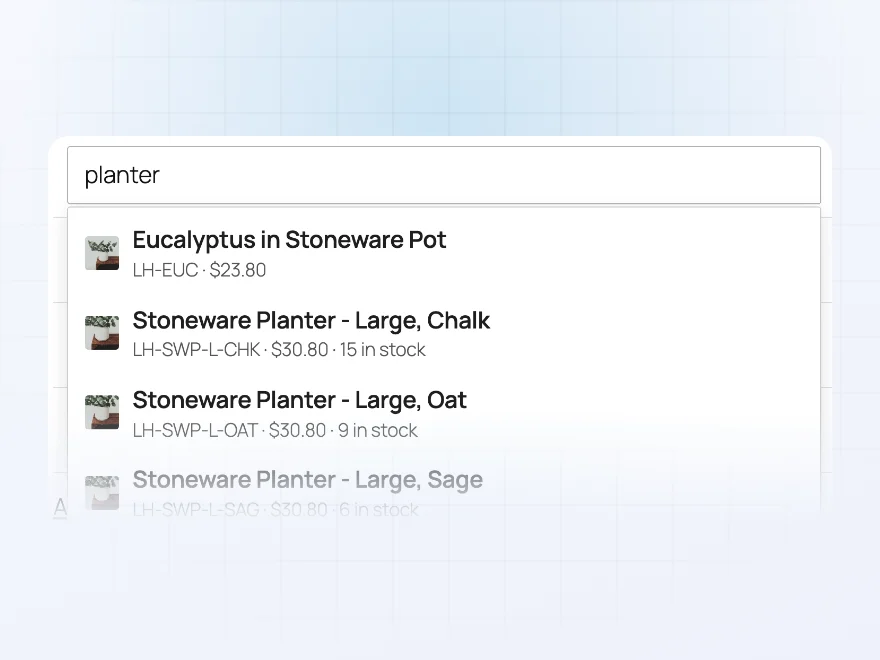
Type a few letters of a product name or SKU and the form suggests matching products and variations, each with its SKU, the customer’s price and the stock. Limit the form to some categories, or leave out products it shouldn’t offer.
- Variations listed separately, with their own SKU
- The customer’s own price, including role prices
- Limit the form to some categories
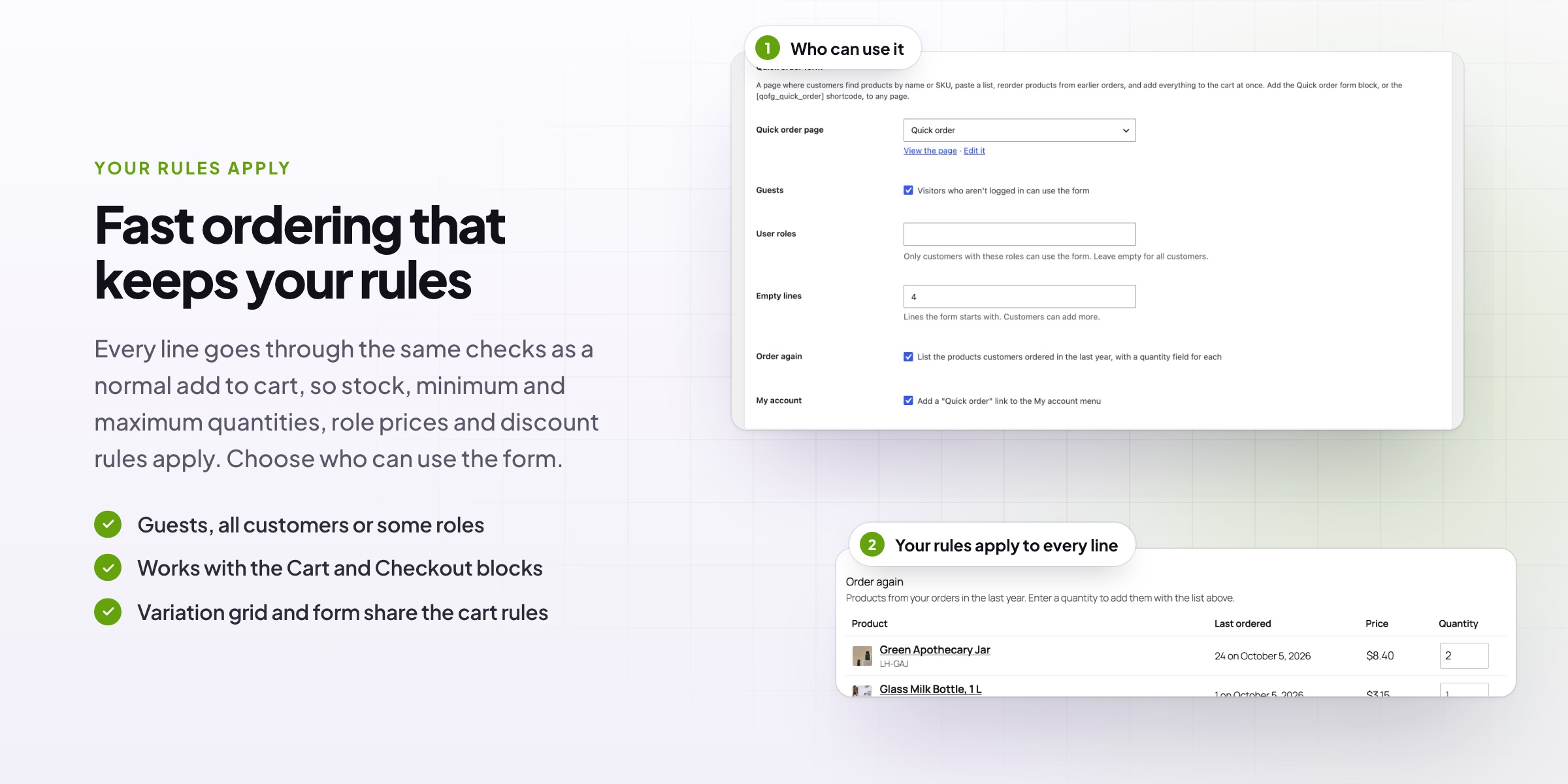
Your rules apply
Stock, minimums and prices respected
Every line goes through the same checks as a normal add to cart, so stock, minimum and maximum quantities, role prices and discount rules apply. Lines that can’t be added say why.
- Stock and quantity rules checked
- Role prices and discounts apply
- Lines that can’t be added say why
Per product
On for every variable product, or just some
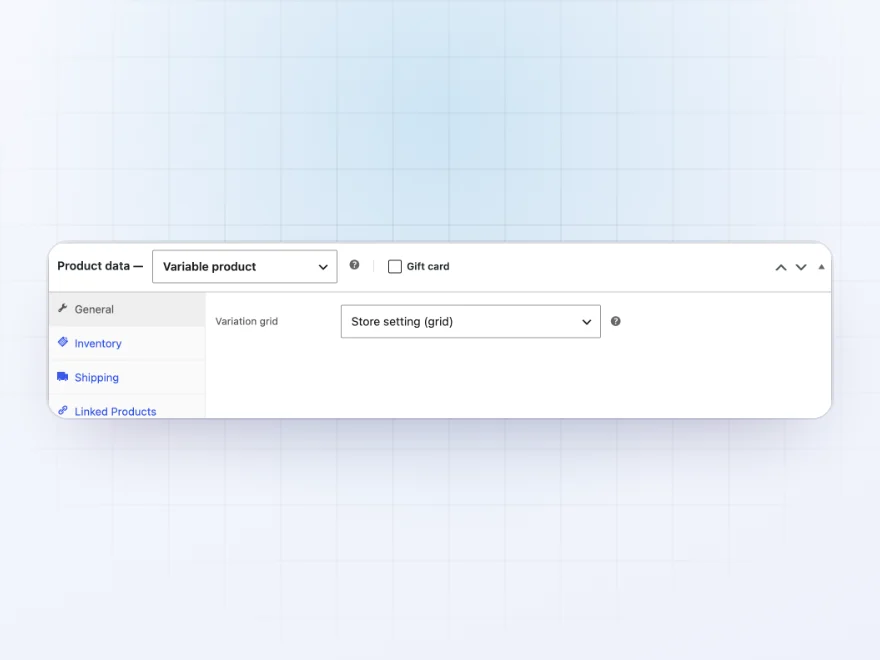
Turn the grid on for all variable products, then switch it off or on for single products from the product screen. Show a product’s grid on any page with the Variation grid block or a shortcode.
- Store-wide or per product
- A setting on each product
- A block for any page
Who can order
A quick order page for chosen customers
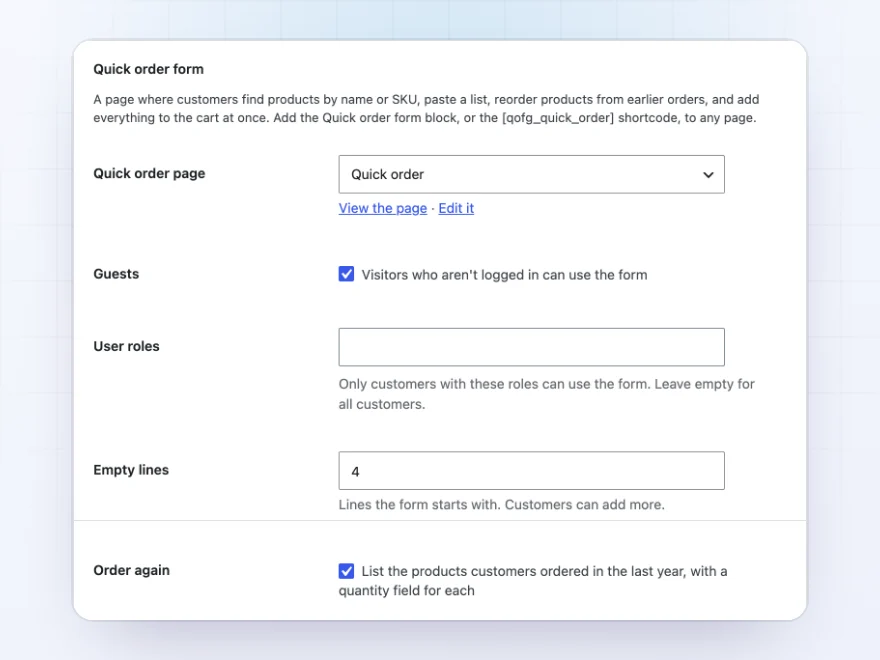
Choose who can use the quick order form: guests, all customers or some user roles. A button creates the page for you, and a link can be added to My Account.
- Guests, customers or some roles
- The page created for you
- A link in My Account
Docs and support
Try it, set it up, ask us anything
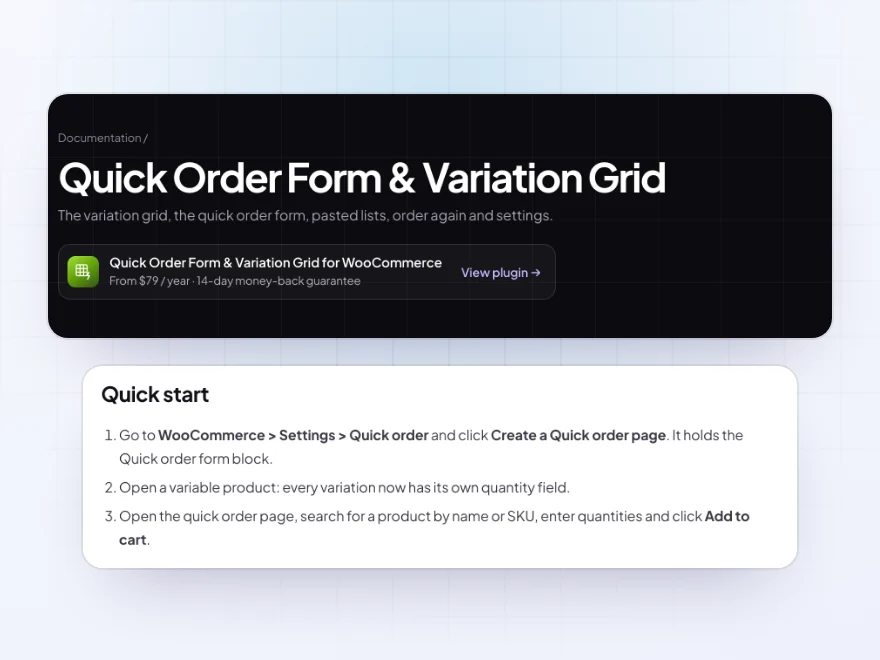
Try Quick Order Form & Variation Grid in a live demo store before you buy. The docs start with a quick start and cover the variation grid, the quick order form and paste a list. Support tickets are answered by the developers who make the plugin, and updates are included.
- A live demo store to try it first
- Step-by-step docs with a quick start
- Most tickets answered within 12–24 hours
A WooCommerce bulk order form and variation grid
Quick Order Form & Variation Grid gives customers who buy in quantity two faster ways to order. The WooCommerce bulk order form lets them search by name or SKU, paste a list from a spreadsheet or reorder what they bought before, then add everything to the cart at once.
On variable products, the variation grid shows every size and colour with its own quantity field in place of the drop-downs. Both work with your stock, minimum quantities, role prices and discounts, so this quick order form for WooCommerce fits wholesale and retail stores alike.
Common setups
- Sizes and colors: every size of every color on one grid, with stock and prices.
- Reorders: trade customers order again from what they bought in the last year.
- Purchase lists: SKUs and quantities pasted from a spreadsheet.
- Trade only: the quick order form for your wholesale role, linked from My Account.
- Event orders: one page where a school or office orders a whole list at once.
Questions before you buy
Do my other rules still apply?
Yes. Every line goes through the same checks as a normal add to cart, so stock, minimum and maximum quantities, role prices and discount rules all apply.
Can only wholesale customers use the quick order form?
Yes. Choose who can use it: guests, all customers or some user roles, and add a link to it in My Account.
Can I turn the grid off for some products?
Yes. Turn it on for all variable products in the settings, then switch it off or on per product.
What happens to lines that can’t be added?
Everything else goes into the cart, and each line that couldn’t be added says why, such as out of stock or below a minimum quantity.
Does it work with the Cart and Checkout blocks?
Yes. Products added from the grid or the form appear in the classic cart and in the Cart and Checkout blocks.
Can I put a grid on another page?
Yes. Add the Variation grid block, or a shortcode in classic themes, and choose the product.
Does the form show trade prices?
Yes. Prices show as the customer pays them, including prices from Role Based Pricing & Wholesale Prices.
Requirements
WordPress 6.8 or newer, WooCommerce 10.0 or newer and PHP 7.4 or newer. Works with classic and block themes, the Cart and Checkout blocks, and High-Performance Order Storage.
Documentation
Step-by-step setup, every setting explained, and examples: read the documentation. Questions before you buy? Ask us.




isabel.b –
Handy to review the orders from the dashboard. took a couple of test orders to get it right
Pawel S. –
Fits our workflow
I only needed the multi-variation ordering and it was easy. Support is responsive. Recommended.
Elin G. –
works for our needs. nothing fancy. Michael answered my question quickly
Kasia Ceramics –
the grid is handled properly including out of stock sizes. Thomas is AMAZING, replied in minutes. good plugin
Elisa H. –
does what we bought it for. I use a fraction of the features. support is helpful
Piotr Lewandowski –
Great for wholesale buyers
Our buyers usually want several sizes, and the grid saves a lot of clicking. We put the quick order form on its own page too. Michael set this up for us. Highly recommended.
Joost V. –
the grid works well and handles stock. no complaints
aperrin –
Tested it on staging first and moved over with no issues. good support too. Would buy again
Tobias –
Works well
The size and colour grid is what we needed. Support is quick and helpful. Works well.
carmenh –
just wanted the pasted lists and its easy
ninaprints –
Good for repeat orders
The SKU paste list is great for our regulars. I had to tidy our SKUs first. Thomas was really helpful. Four stars.
Alvaro R. –
Perfect for our buyers who need several sizes at once. Michael set it up on the product page for me. Recommended.