
Dynamic Pricing & Discount Rules sets up discounts as a list of rules: product and quantity discounts, buy X get Y, order discounts, free gifts and sales. Each rule has a one-line summary, and customers see what they save on product pages and in the cart.
Requirements
- WordPress 6.8 or newer
- WooCommerce 10.0 or newer
- PHP 7.4 or newer
- Works with classic and block themes, the Cart and Checkout blocks, and High-Performance Order Storage.
Installation
- Download
dynamic-pricing-discount-rules.zipfrom My account > Downloads. - In WordPress, go to Plugins > Add New Plugin > Upload Plugin, choose the zip file and click Install Now.
- Click Activate. Rules and settings are under WooCommerce > Settings > Discount rules.
Quick start: buy more, pay less
- Go to WooCommerce > Settings > Discount rules. With no rules yet, you see examples.
- Click Buy more, pay less. A quantity discount opens with lower prices from larger quantities.
- Choose the products it covers and change the steps if you like, then click Save changes.
- Open one of the products: a table shows the quantity discounts, and the cart shows the saving.
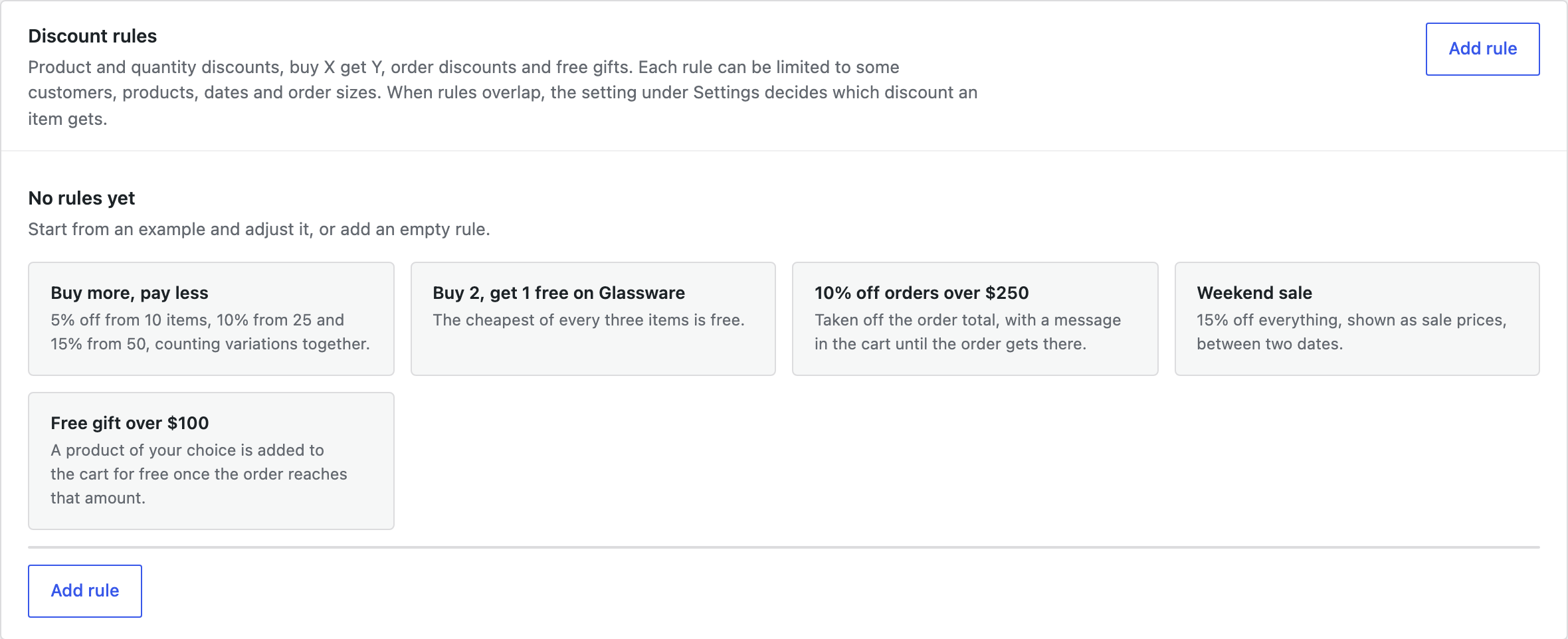
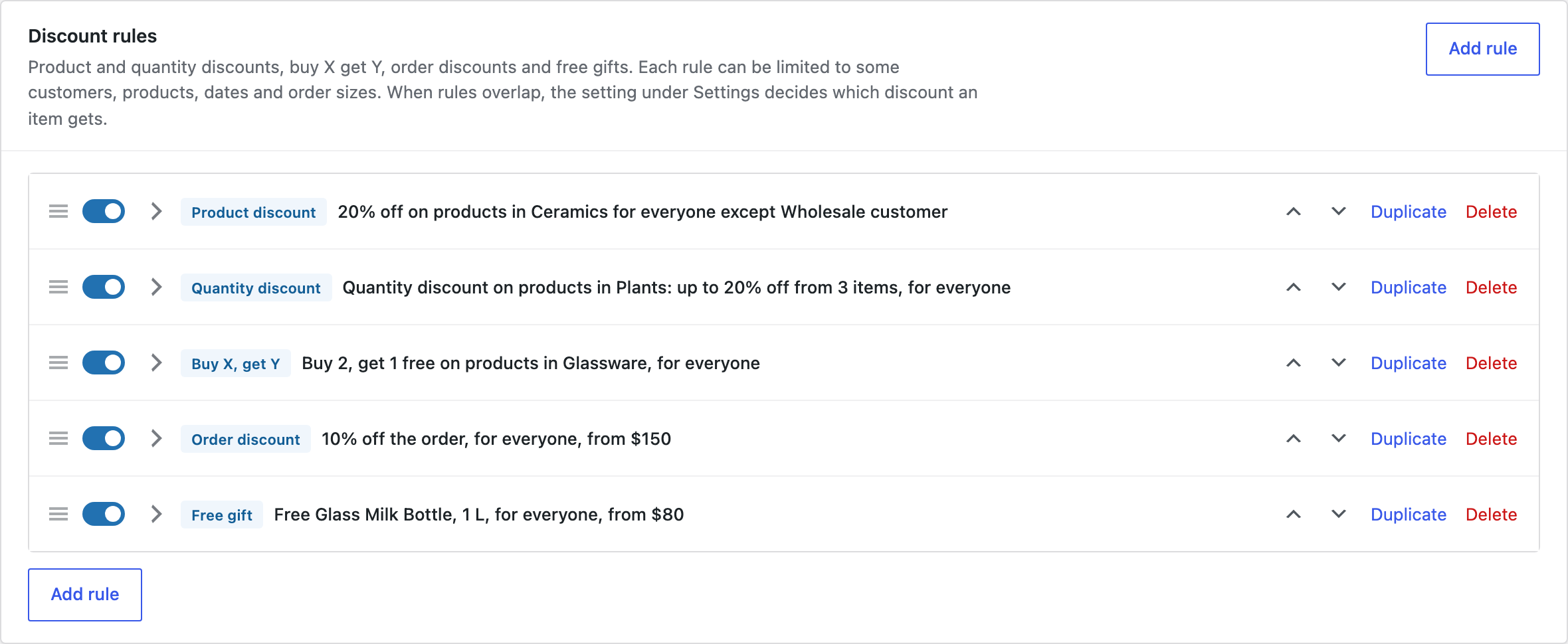
Kinds of rule
| Rule | What it does |
|---|---|
| Product discount | A percentage off, an amount off or a fixed price, shown as a sale price with the regular price crossed out. |
| Quantity discount | Lower prices from 10, 25 or 50 items, counted for each product, for variations of a product together, or for all products of the rule together (mix and match). |
| Buy X, get Y | Buy 2, get 1 free, or buy 3, get 1 at 50% off. The cheapest items are discounted. The items given can be the same products or others, and the offer can repeat. |
| Order discount | A percentage or an amount off the order, such as 10% off orders from $150, added as a discount line with the rule’s name. |
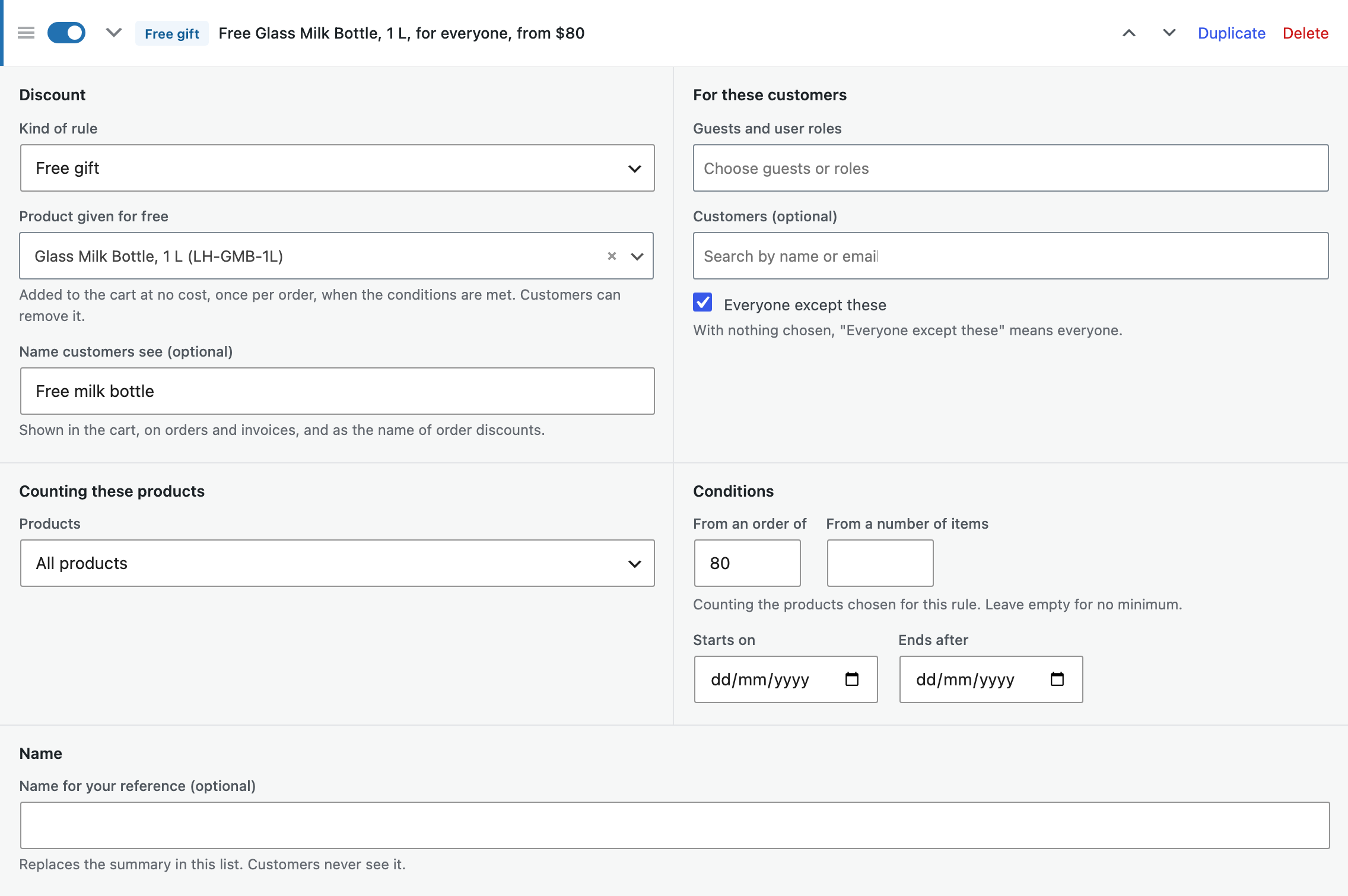
| Free gift | A product added to the cart at no cost when the order qualifies, and removed when it no longer does. |
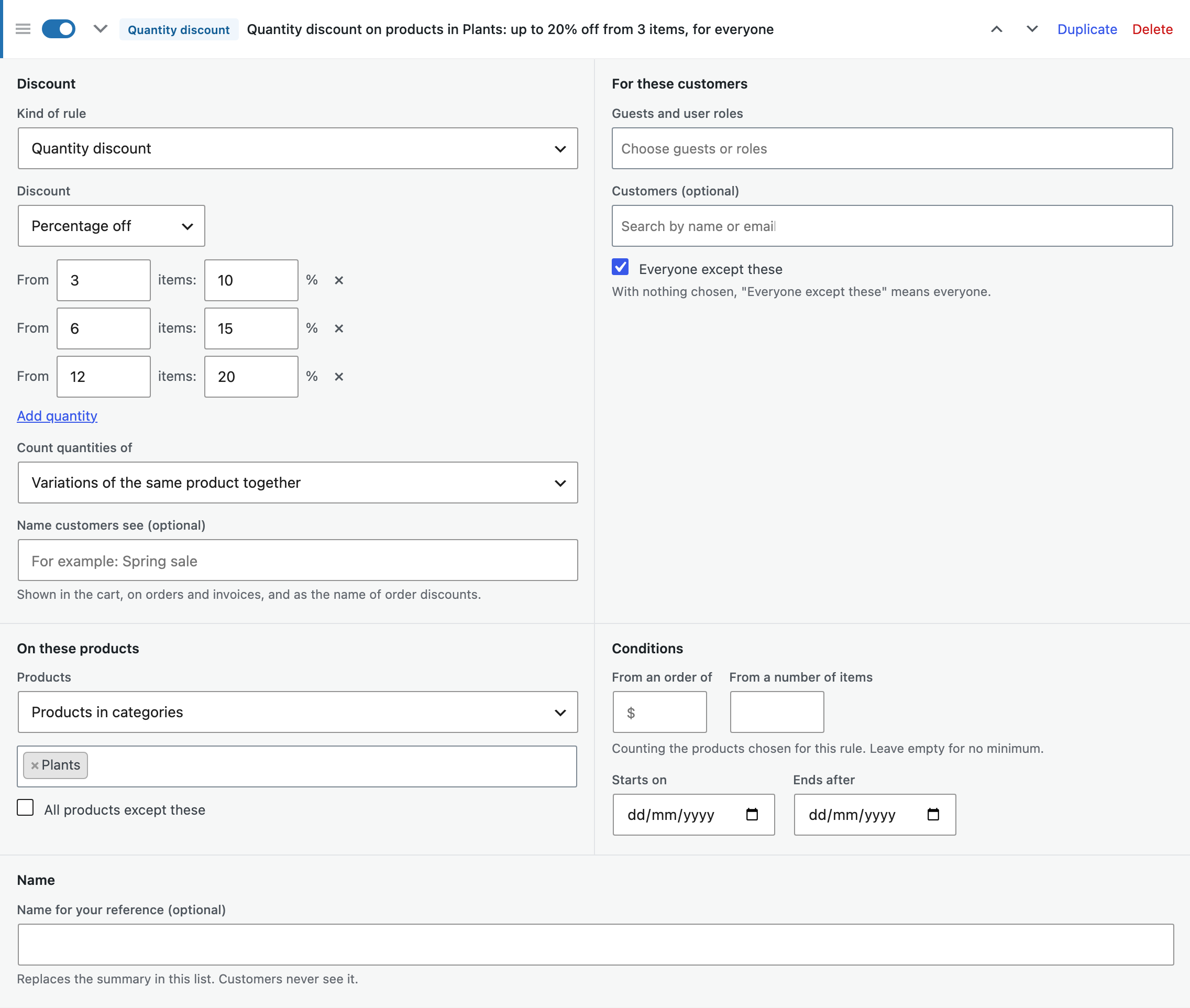
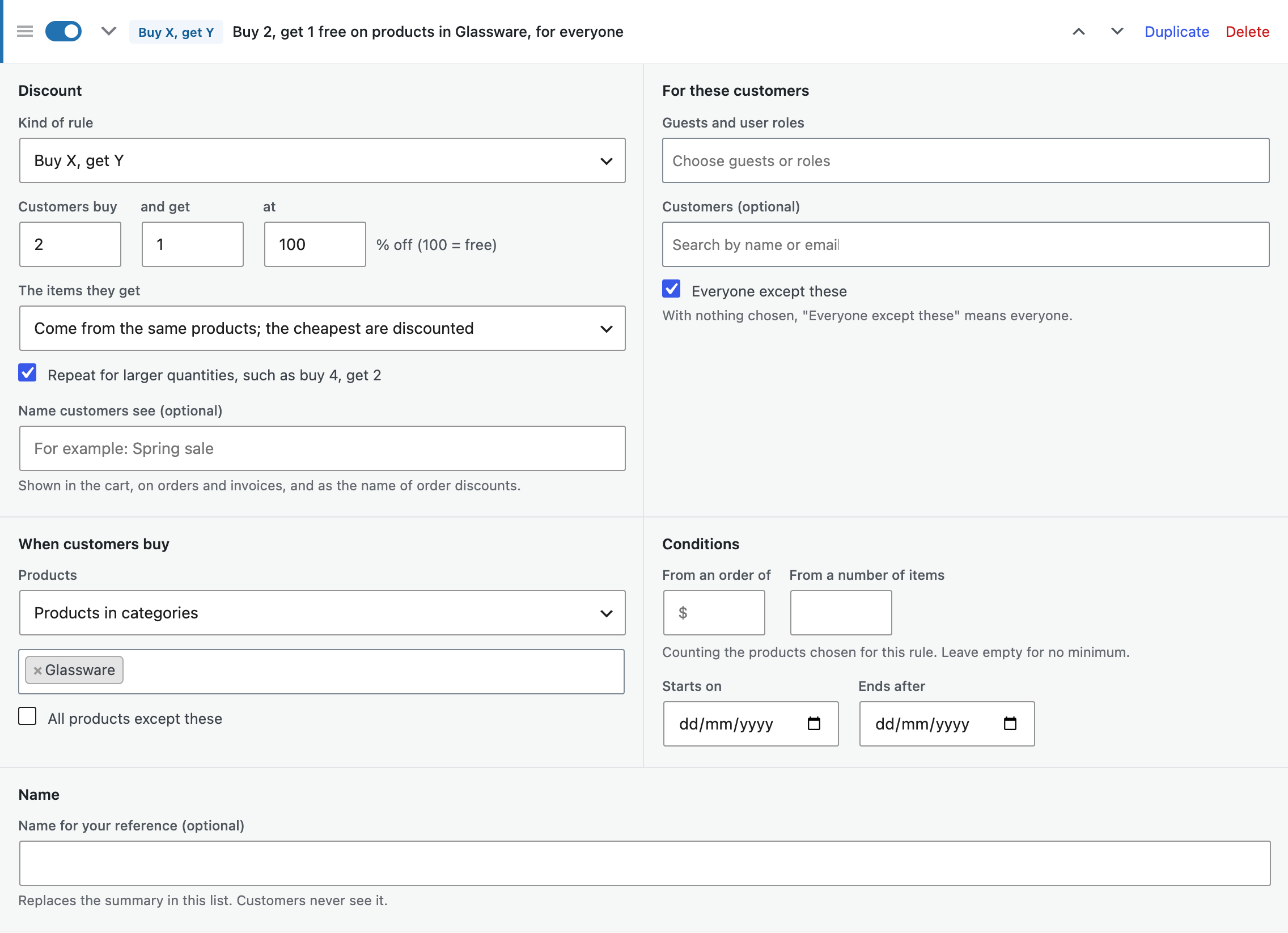
Who, what and when
- Customers: guests, user roles or chosen customers, or everyone except them.
- Products: all products, categories with their subcategories, tags, brands or single products, or all products except them.
- When: start and end dates, a minimum order amount and a minimum number of items.
What customers see
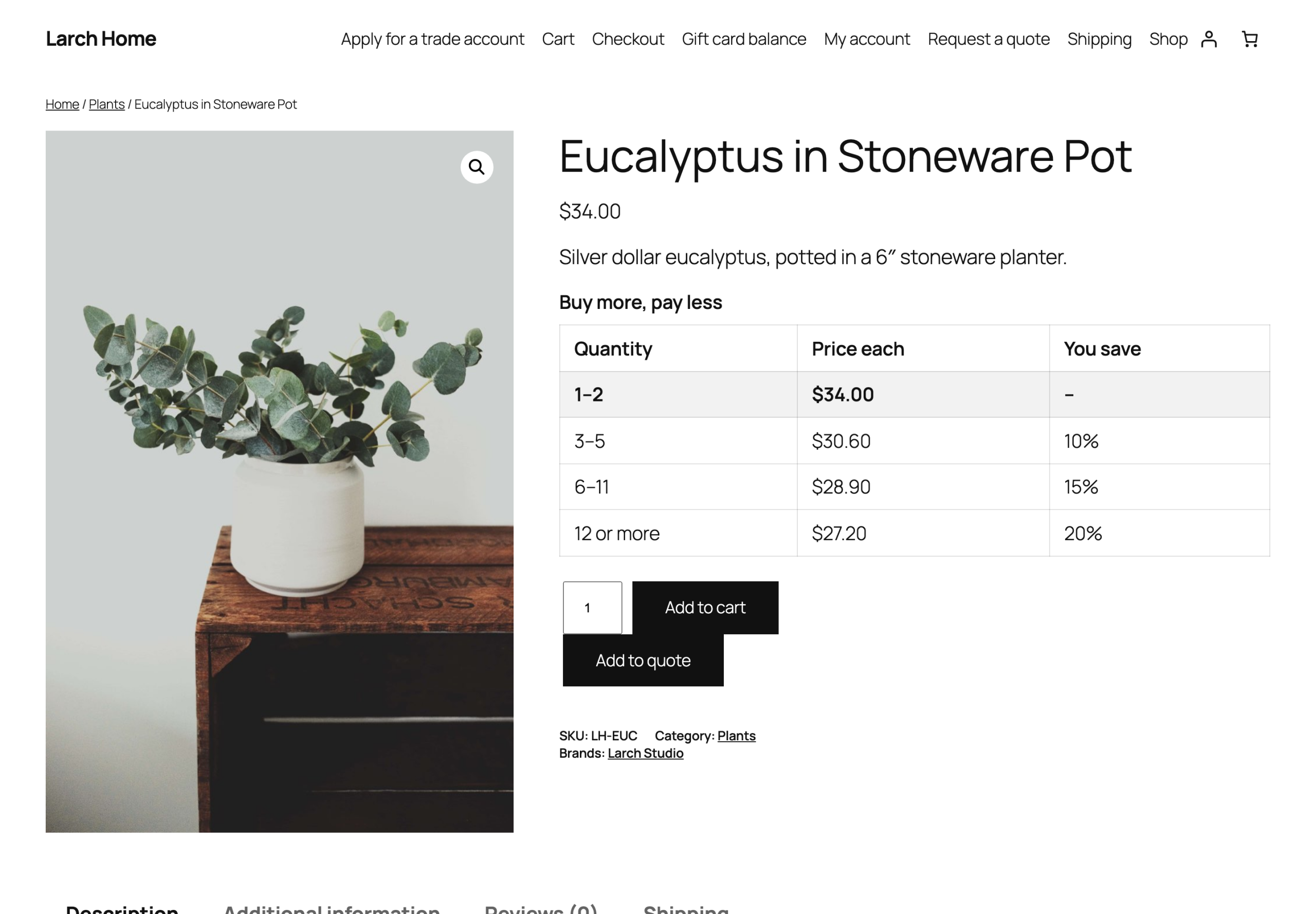
Discounted prices show on product pages, in product lists and blocks, and in the Store API. A table on the product page lists the quantity discounts and follows the chosen variation and quantity.
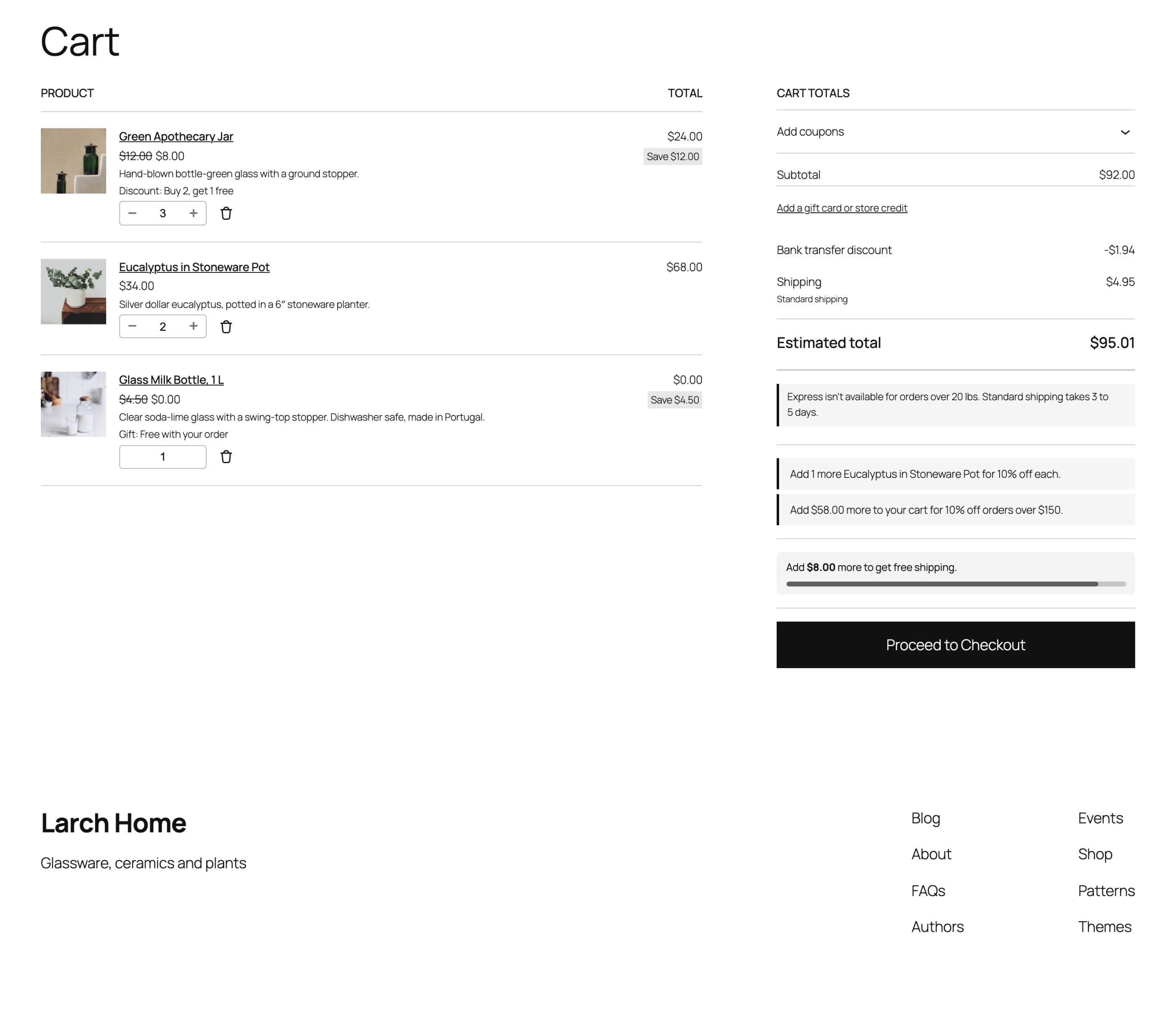
In the cart, the original price is crossed out with the name of the discount under each item. Messages tell customers what to add for the next discount, such as “Add $24.00 more to get 10% off your order”, in the classic cart and the Cart block. Discounts and their names are saved on each order.
Settings
| Setting | What it does |
|---|---|
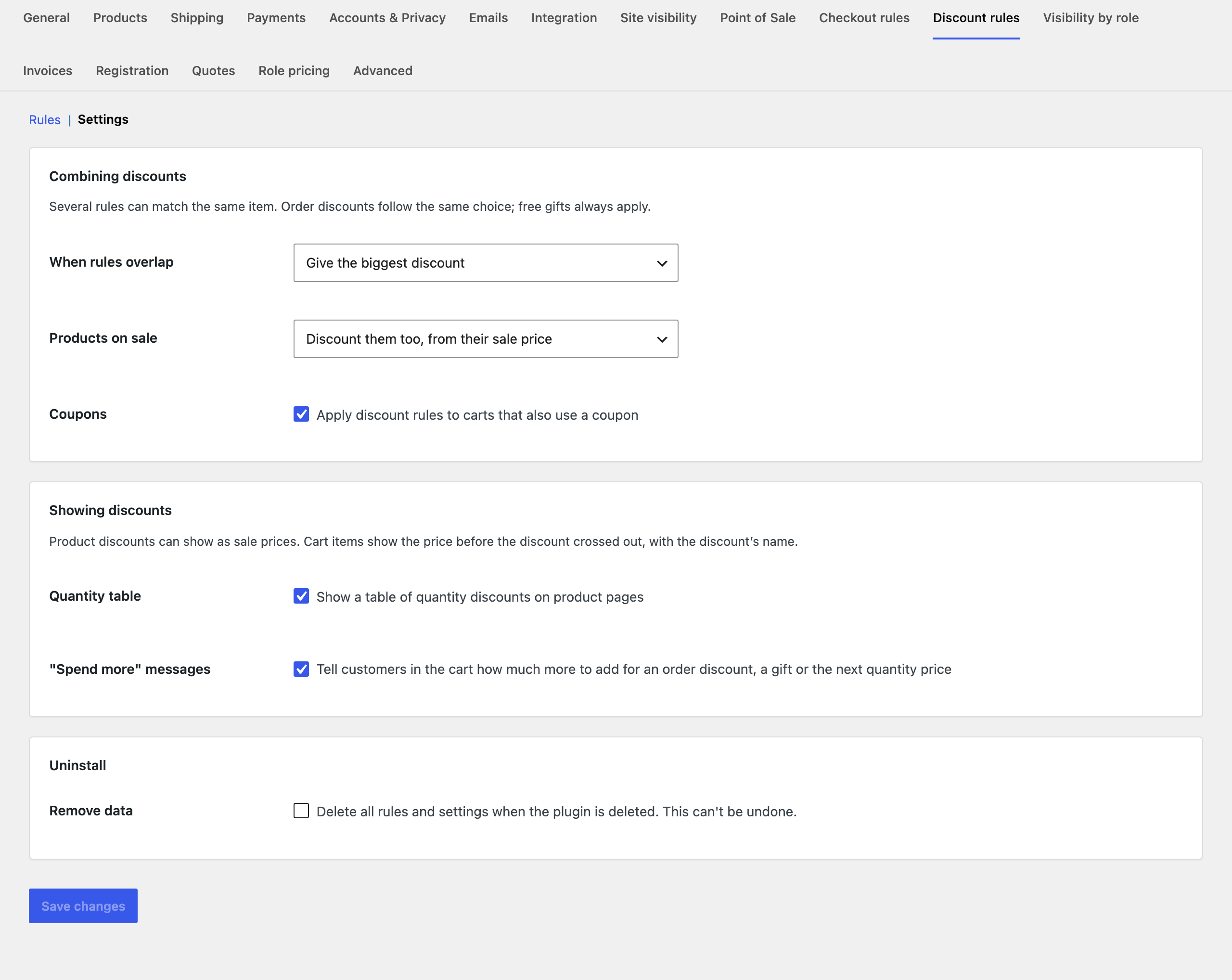
| When rules overlap | Give the biggest discount, use the first rule in the list, or apply every rule one after another. |
| Products on sale | Discount them too, from their sale price, or leave them out of product and quantity discounts. |
| Coupons | Apply discount rules to carts that also use a coupon. |
| Quantity table | Show the table of quantity discounts on product pages. |
| “Spend more” messages | Tell customers in the cart how much more to add for an order discount, a gift or the next quantity price. |
| Remove data | Deletes all rules and settings when the plugin is deleted. |
For developers
| Hook | Use |
|---|---|
dpdr_rules | The rules before they are applied. |
dpdr_item_discounts | The discounts of a cart item. |
dpdr_can_discount_item | Whether a cart item can be discounted. |
dpdr_nudges | The “spend more” messages shown in the cart. |
dpdr_viewer, dpdr_today | The customer and the date rules are checked against. |
dpdr_example_rules, dpdr_admin_capability | The examples, and the capability needed to change rules. |
Copy public/templates/tier-table.php or cart-nudges.php to yourtheme/dynamic-pricing-discount-rules/ to change the quantity table or the cart messages.
Frequently asked questions
Are discounts applied as coupons?
No. Product, quantity and buy X, get Y discounts change the item prices. Order discounts are added as a discount line with the rule’s name, so coupons keep working next to them.
Does it work with role prices?
Yes. With Role Based Pricing & Wholesale Prices active, discounts start from the customer’s role price.
Changelog
1.6.2 · August 11, 2026
Maintenance
- Fixed a settings notice remaining visible after the configuration had been saved.
- Improved validation of saved settings during plugin updates.
1.6.0 · August 7, 2026
Compatibility update
- Updated compatibility checks for current WooCommerce releases.
- Improved translated notices and settings labels.
1.5.2 · April 21, 2026
Hotfix
- Fixed an outdated savings message after removing the last discounted cart item.
1.5.0 · April 15, 2026
Feature update
- Extended discount messages and totals to the Cart and Checkout blocks.
- Improved handling of cart updates without a full page refresh.
1.4.1 · February 3, 2026
Hotfix
- Fixed a coupon discount being counted twice when combined with an order-level rule.
1.4.0 · January 16, 2026
Feature update
- Added controls for overlapping rules, sale products and coupons.
- Improved the drag-and-drop rule order and the priority summary.
- Compatibility: updated integration checks for WooCommerce 10.x.
1.3.2 · October 11, 2025
Hotfix
- Fixed the spend-more message including an excluded product in the qualifying total.
1.3.0 · October 2, 2025
Feature update
- Added order discounts and messages showing how much more qualifies for an offer.
- Added date and customer-role conditions to discount rules.
1.2.1 · July 4, 2025
Maintenance
- Fixed the quantity table showing the parent price instead of the selected variation price.
1.2.0 · June 26, 2025
Feature update
- Added quantity pricing tables and crossed-out regular prices.
- Improved price updates when customers select a variation.
1.1.3 · March 7, 2025
Maintenance
- Fixed an automatically added gift remaining in the cart after the qualifying quantity was reduced.
1.1.0 · March 3, 2025
Feature update
- Added buy X get Y rules and free gifts above a qualifying order amount.
- Added clearer summaries for the qualifying products and quantities.
- Compatibility: updated integration checks for WooCommerce 9.x.
1.0.1 · December 1, 2024
Hotfix
- Fixed discount totals being recalculated twice when a cart quantity was changed.
1.0.0 · November 25, 2024
Initial release
- Initial release.
- Create product and quantity discount rules for WooCommerce.