
Role Based Pricing & Wholesale Prices sets prices and quantity prices per user role or customer, on each product or with store-wide rules. The right price shows on product pages, in product lists and blocks, in the Store API, and in the cart and checkout.
Requirements
- WordPress 6.8 or newer
- WooCommerce 10.0 or newer
- PHP 7.4 or newer
- Works with classic and block themes, the Cart and Checkout blocks, and High-Performance Order Storage.
Installation
- Download
role-based-pricing-wholesale.zipfrom My account > Downloads. - In WordPress, go to Plugins > Add New Plugin > Upload Plugin, choose the zip file and click Install Now.
- Click Activate. Role prices are set in each product’s General tab. Rules, the price list and the settings are under WooCommerce > Settings > Role pricing.
Quick start: a trade price for wholesale customers
- Go to WooCommerce > Settings > Role pricing. With no rules yet, you see examples based on your store.
- Click the trade prices example. The rule opens: 30% off the regular price on everything, for your wholesale role.
- Change the amount, the role or the products if you like, and click Save changes.
- On the storefront, choose View prices as in the toolbar and pick the role to see what it pays.
Prices on a product
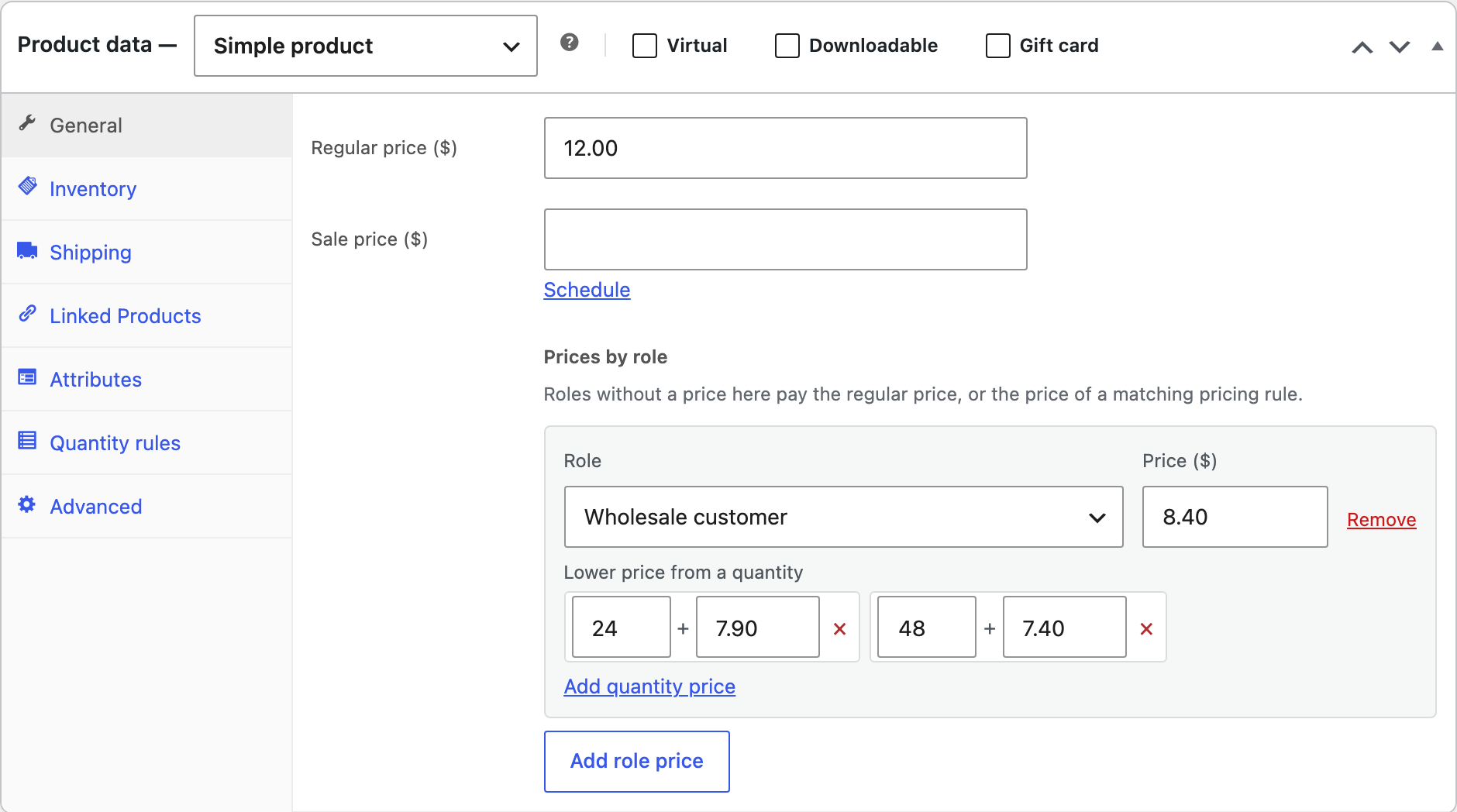
Open a product’s General tab, or a variation, and click Add role price under Prices by role. Choose the role and its price, and add lower prices from a quantity, such as 24 or more at $7.90. A price saved on the product comes before any rule.
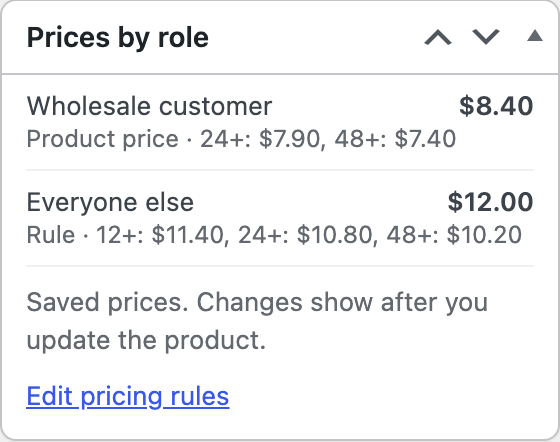
Products without a regular price can still have a role price, so a range can be sold to trade accounts only. The Prices by role box on the product screen shows what each role pays and where the price comes from.
Pricing rules
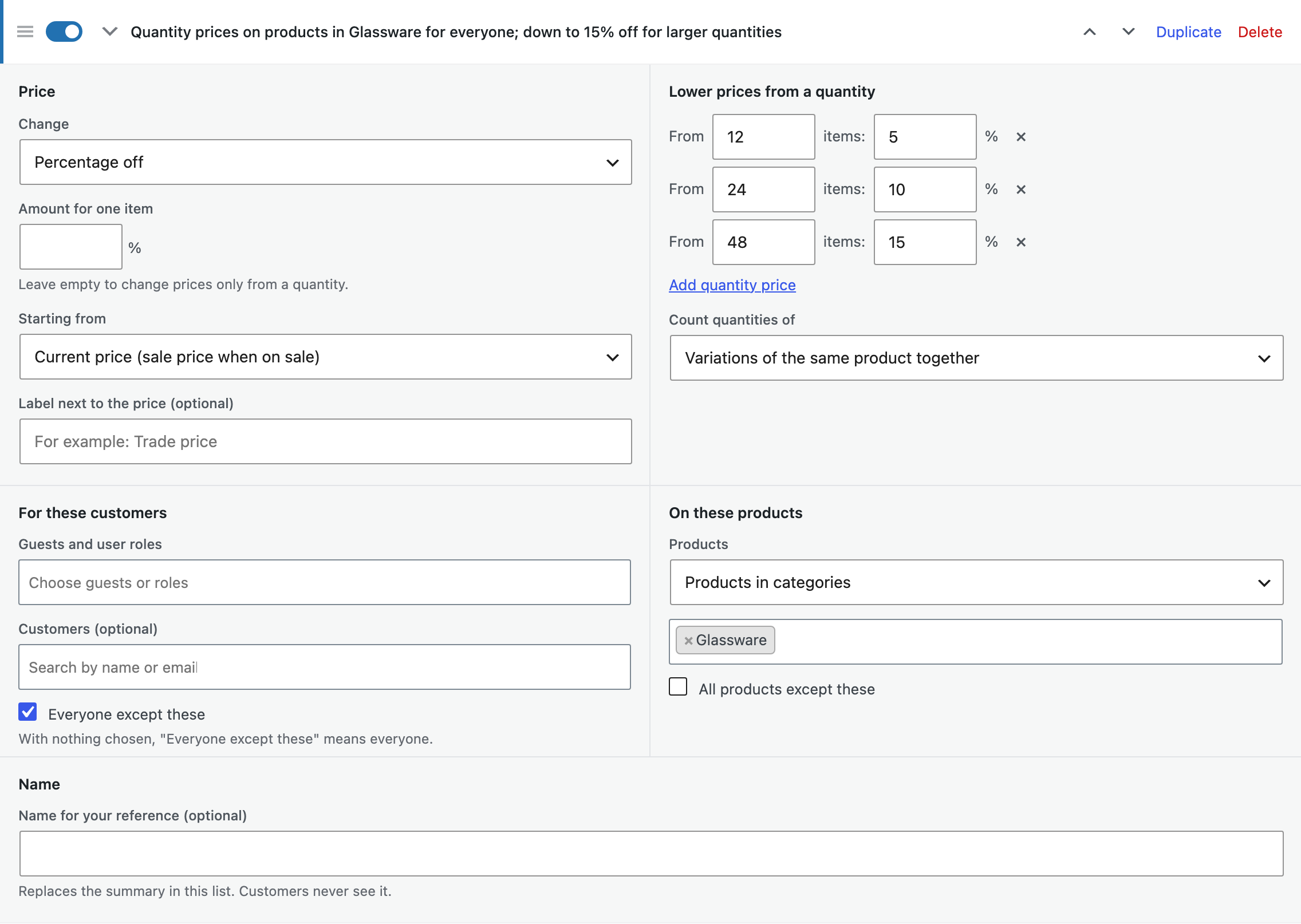
Rules change prices for many products at once. Each rule chooses:
| Choice | Options |
|---|---|
| Change | A percentage off, a markup, an amount off or a fixed price. |
| Starting from | The regular price, or the current price (the sale price while a product is on sale). |
| Lower prices from a quantity | Extra steps such as 5% off from 10 items. Count each product on its own, the variations of a product together, or everything the rule covers together. |
| Customers | Guests, user roles or chosen customers, or everyone except them. |
| Products | All products, categories with their subcategories, tags, brands or single products, or all products except them. |
| Label | Optional text after the price, such as “Trade price”. |
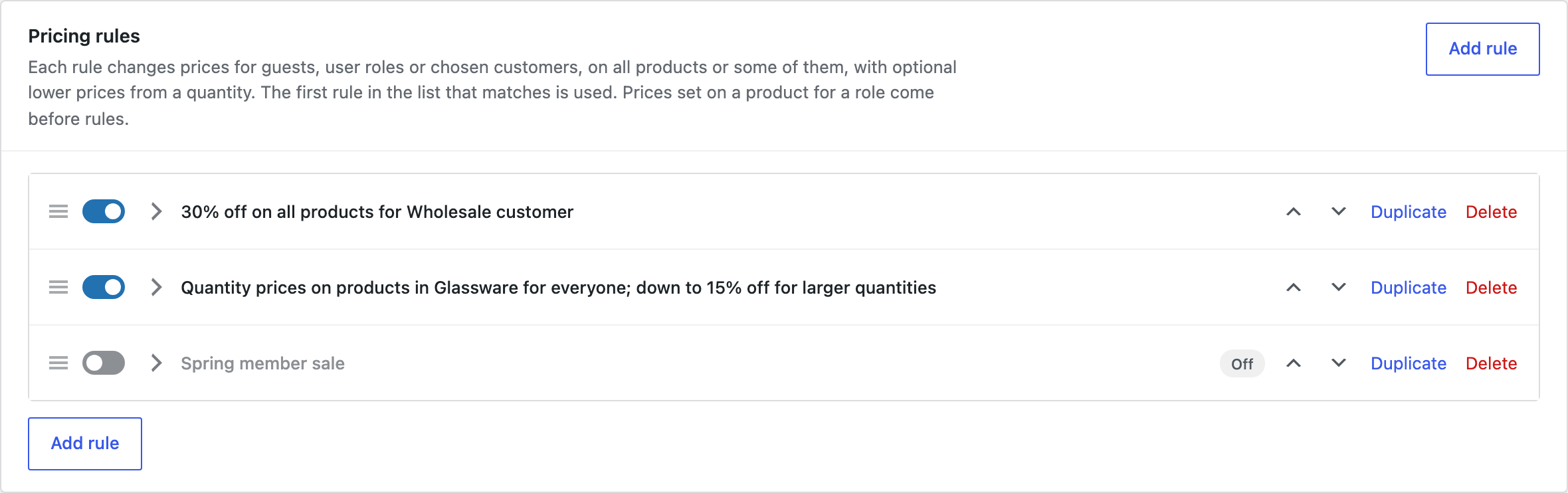
The first rule in the list that covers the product and the customer is used. Drag rules to change the order, switch them on and off, and duplicate them.
What customers see
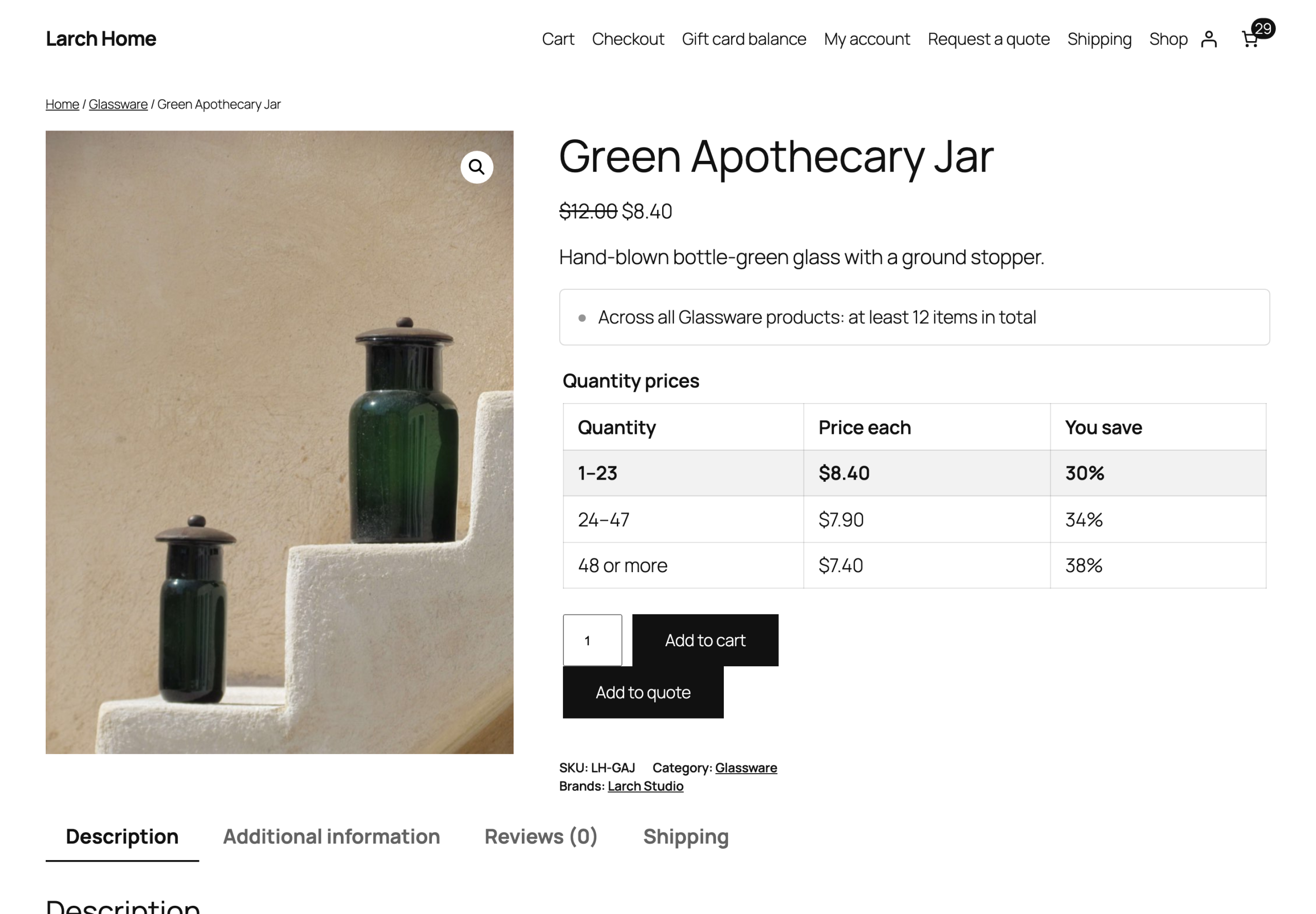
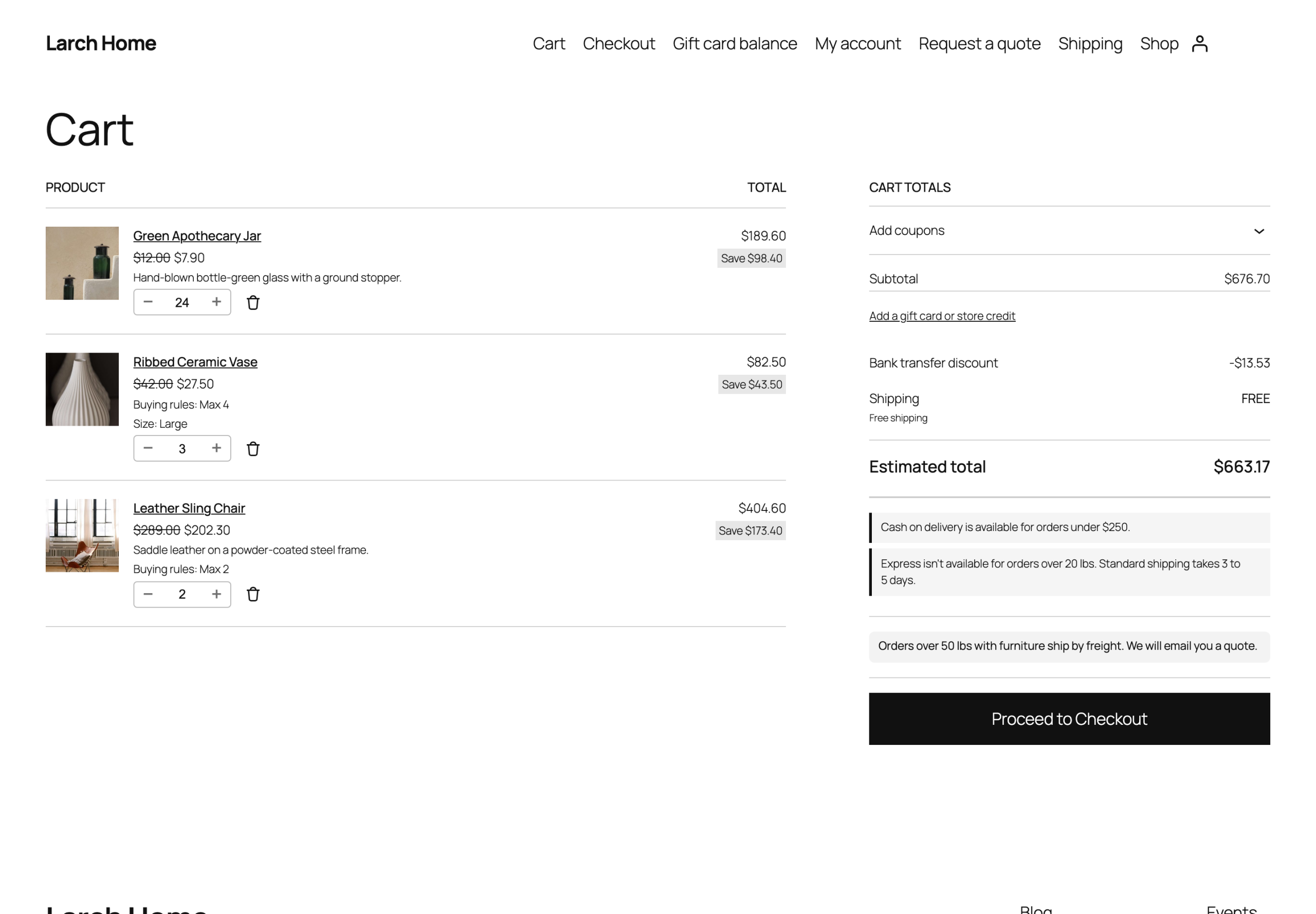
Customers see their own price everywhere a product appears, with the regular price crossed out if you choose. A table on the product page lists the quantity prices and follows the chosen variation and quantity.
The price list
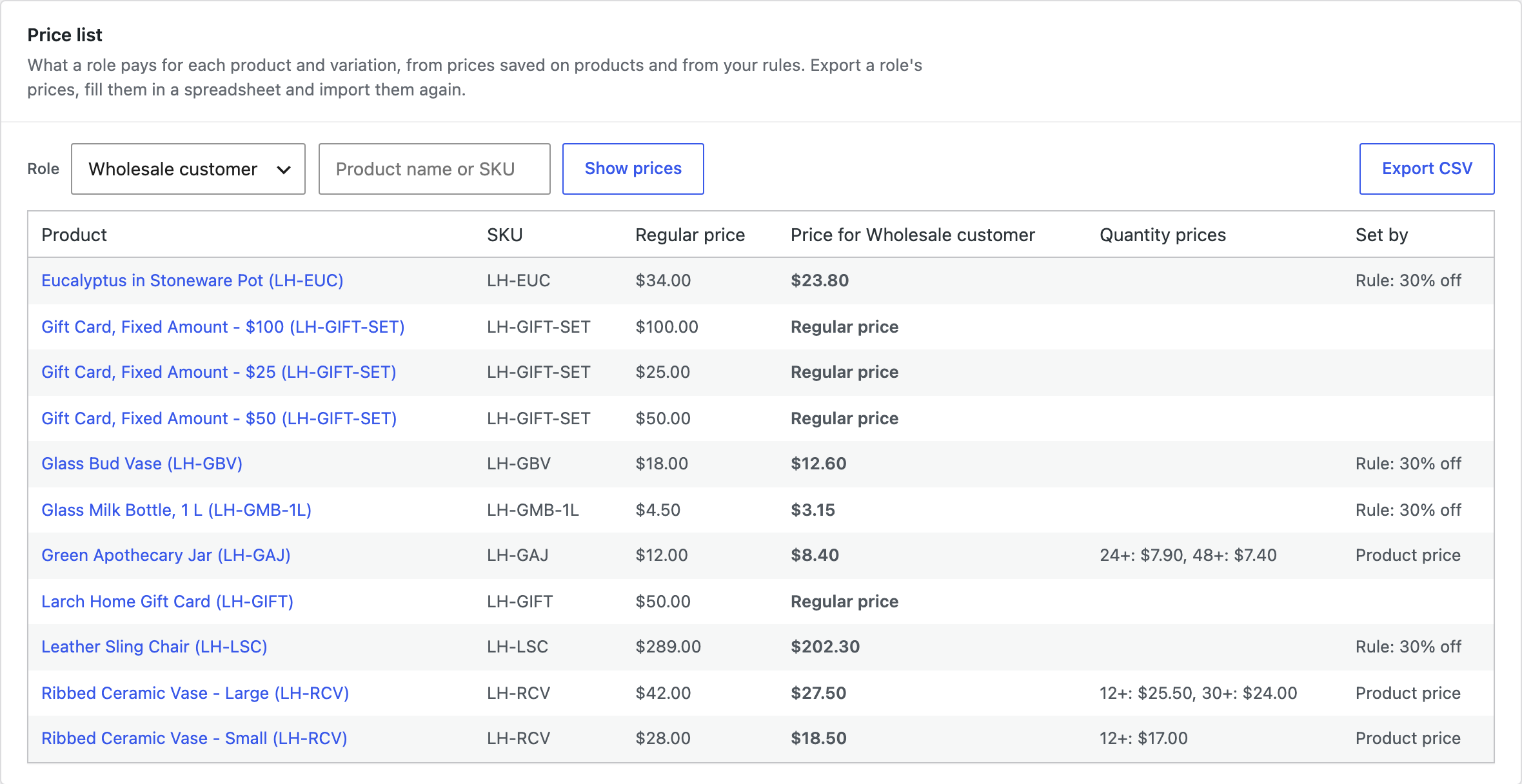
Role pricing > Price list shows what a role pays for every product and variation, and whether a product price or a rule sets it. Click Export CSV to fill in prices in a spreadsheet, then import the file again to save them on the products.
View prices as
Shop managers can browse the store with the prices of a guest, a user role or a customer: choose View prices as in the toolbar on the storefront, or use the link on the rules screen. With Hide Products & Prices by User Role active, its View store as menu shows both.
Settings
| Setting | What it does |
|---|---|
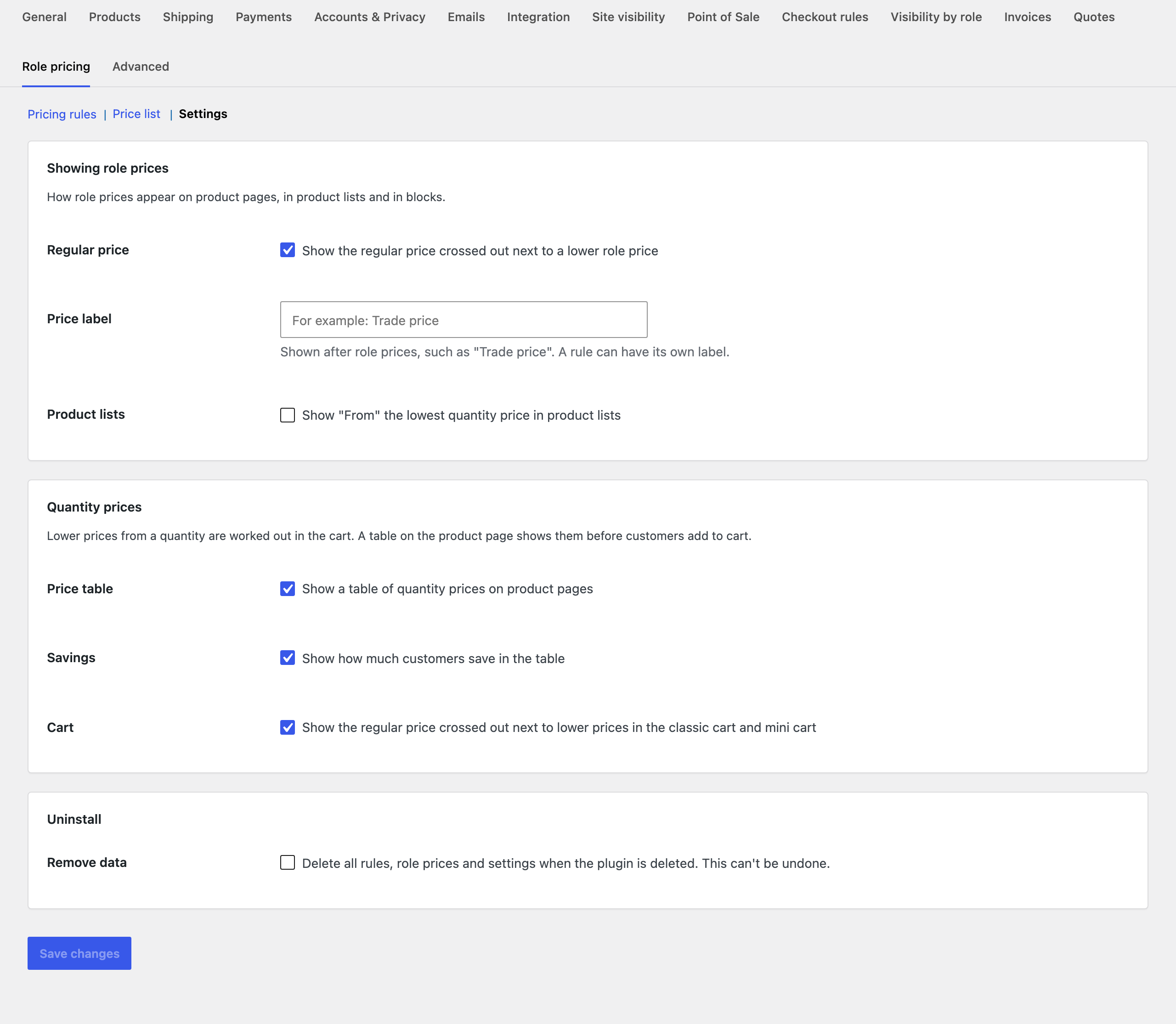
| Regular price | Show the regular price crossed out next to a lower role price. |
| Price label | Text after role prices, such as “Trade price”. A rule can have its own label. |
| Product lists | Show “From” the lowest quantity price in product lists. |
| Price table | Show the table of quantity prices on product pages. |
| Savings | Show how much customers save in the table. |
| Cart | Show the regular price crossed out in the classic cart and mini cart. |
| Remove data | Deletes all rules, role prices and settings when the plugin is deleted. |
For developers
| Hook | Use |
|---|---|
rbpw_rules | The pricing rules before they are applied. |
rbpw_offer | The price a customer gets for a product, with its quantity prices. |
rbpw_viewer | Who is viewing the store: guest, roles and user ID. |
rbpw_is_storefront_request | Whether a request is the storefront, where role prices apply. |
rbpw_example_rules | The examples offered when there are no rules. |
rbpw_admin_capability | The capability needed to change prices and rules. |
rbpw_before_tier_table, rbpw_after_tier_table | Run around the quantity price table. |
Copy public/templates/tier-table.php to yourtheme/role-based-pricing-wholesale/ to change the quantity price table.
Frequently asked questions
Which price wins when several apply?
A price saved on the product for the customer’s role comes first. Otherwise the first rule in the list that covers the product and the customer is used. Customers with several roles get the lowest product price of their roles.
Does it work with page caching?
Yes. Caching plugins serve cached pages to guests only, and guests all see the same prices. Logged-in customers get pages built for them.
Do sale prices still work?
Yes. Rules can start from the regular price or from the current price, which is the sale price while a product is on sale.
Changelog
1.5.0 · September 19, 2026
Compatibility update
- Updated compatibility checks for current WooCommerce releases.
- Improved translated notices and settings labels.
1.4.5 · February 13, 2026
Maintenance
- Fixed the preview role remaining selected after switching back to the current customer.
1.4.0 · February 8, 2026
Feature update
- Added the storefront preview for guest, role and customer prices.
- Improved the indication of which rule supplies a product price.
1.3.1 · July 20, 2025
Maintenance
- Fixed decimal prices being read incorrectly from CSV files using comma separators.
1.3.0 · July 16, 2025
Feature update
- Added CSV export and import for role price lists.
- Improved validation of price columns during import.
- Compatibility: updated integration checks for WooCommerce 9.x.
1.2.3 · January 10, 2025
Hotfix
- Fixed the tier price not updating when a different variation was selected.
1.2.0 · December 29, 2024
Feature update
- Added quantity pricing tiers and a pricing table on product pages.
- Added an option to count variations of the same product together.
- Compatibility: updated integration checks for WooCommerce 9.x.
1.1.3 · June 24, 2024
Hotfix
- Fixed category rules being applied twice when a product belonged to two matching categories.
1.1.0 · June 16, 2024
Feature update
- Added store-wide pricing rules for selected roles and product categories.
- Improved the rule priority controls and added clearer rule summaries.
1.0.2 · December 14, 2023
Hotfix
- Fixed role prices not refreshing immediately after a customer logged in.
1.0.0 · December 8, 2023
Initial release
- Initial release.
- Set wholesale prices by user role on products and variations.